EducationSoftwareStrategy.com
StrategyCommunity

Knowledge Base

Product

Community

Knowledge Base

TopicsBrowse ArticlesDeveloper Zone

Product

Download SoftwareProduct DocumentationSecurity Hub

Education

Tutorial VideosSolution GalleryEducation courses

Community

GuidelinesGrandmastersEvents
x_social-icon_white.svglinkedin_social-icon_white.svg
Strategy logoCommunity

© Strategy Inc. All Rights Reserved.

LegalTerms of UsePrivacy Policy
  1. Home
  2. Topics

KB11267: “Failed to segment the subscription set …[Level:SEVERE ERROR][Code:0xa98]” error message appears when using pre-SQL statements in a MicroStrategy Narrowcast Server service.


Community Admin

• Strategy


This knowledge base article explains why “Failed to segment the subscription set …[Level:SEVERE ERROR][Code:0xa98]” error message appears when using pre-SQL statements in a MicroStrategy Narrowcast Server service.

SYMPTOM:
The following error appears in the System Message Viewer regarding a Strategy Narrowcast Server service that uses a pre-execution Structured Query Language (SQL):


Failed to segment the subscription set …

The error appears even when each statement in the pre-SQL executes without errors when run directly against the database.
 
For more information about pre and post SQL, refer to the following Strategy Knowledge Base document:

  • KB8972: What is the Pre- and Post-service execution SQL in Strategy Narrowcast Server 9.x - 10.x?

CAUSE:
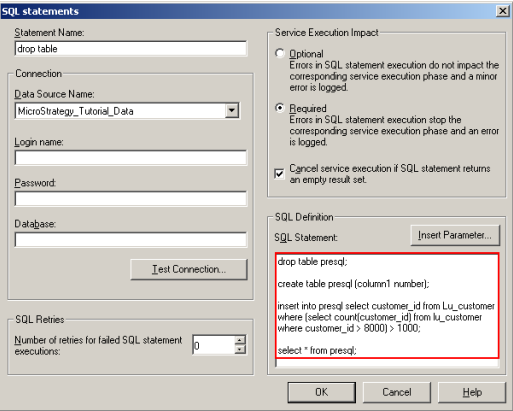
The pre-SQL statement is composed of multiple SQL statements, as illustrated below:
ka04W000000OeK1QAK_0EM440000002Blm.gif

Each pre or post SQL statement must contain no more than a single statement.
 
ACTION:
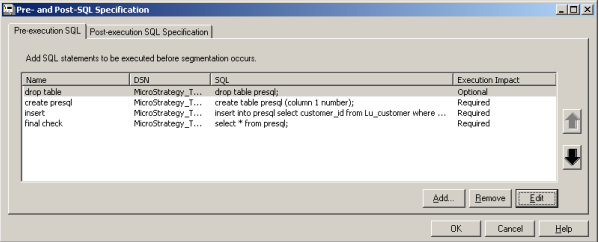
To execute multiple SQL statements before the service segmentation occurs, the correct usage is to create one pre-SQL statement for each individual SQL statement to be executed. In the example above, the service designer would need to create four pre-SQL statements: one to drop the table, one to create the table, one to populate the table, and one to perform the desired test:
ka04W000000OeK1QAK_0EM440000002Blo.gif

The pre-SQL statements are executed in top-down order. The service designer can use the UP and DOWN arrows located on the right to move individual statements up or down in the list.


Comment

0 comments

Details

Knowledge Article

Published:

June 12, 2017

Last Updated:

June 12, 2017