EducationSoftwareStrategy.com
StrategyCommunity

Knowledge Base

Product

Community

Knowledge Base

TopicsBrowse ArticlesDeveloper Zone

Product

Download SoftwareProduct DocumentationSecurity Hub

Education

Tutorial VideosSolution GalleryEducation courses

Community

GuidelinesGrandmastersEvents
x_social-icon_white.svglinkedin_social-icon_white.svg
Strategy logoCommunity

© Strategy Inc. All Rights Reserved.

LegalTerms of UsePrivacy Policy
  1. Home
  2. Topics

KB11280: "Object name is too long.” error message appears when attempting to drill on a report in MicroStrategy Developer 10.x.


Stefan Zepeda

Salesforce Solutions Architect • Strategy


This tech note helps to solve the issue that may occur when attempting to drill down on an attribute or a metric

SYMPTOM:
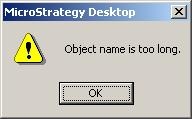
When attempting to drill down on an attribute or a metric, users may receive the following error message:
ka02R000000kcj7QAA_0EM440000002Fmb.jpeg

Object name is too long.
CAUSE:
This error is encountered because the new report name being generated has reached the character limit. Any object in Strategy, including reports, filters, metrics, etc., can only have a name that is 255 characters or less in length.
When drilling in a report, a new report is created with the drilled-to level being appended to the previous report's name, thus constantly increasing the length of the report name each time it is drilled. So, if a user drills from "Sample Report" down to the Customer attribute, the new report will be named "Sample Report > Customer."


Comment

0 comments

Details

Knowledge Article

Published:

April 3, 2017

Last Updated:

April 3, 2017