EducationSoftwareStrategy.com
StrategyCommunity

Knowledge Base

Product

Community

Knowledge Base

TopicsBrowse ArticlesDeveloper Zone

Product

Download SoftwareProduct DocumentationSecurity Hub

Education

Tutorial VideosSolution GalleryEducation courses

Community

GuidelinesGrandmastersEvents
x_social-icon_white.svglinkedin_social-icon_white.svg
Strategy logoCommunity

© Strategy Inc. All Rights Reserved.

LegalTerms of UsePrivacy Policy
  1. Home
  2. Topics

Users are unable to delete multiple dossiers at once in MicroStrategy Desktop and Workstation


Community Admin

• Strategy


Within MicroStrategy Desktop and MicroStrategy Workstation, some of our users have been experiencing the inability to delete multiple dossiers at once. In the product versions, it is possible to delete one dossier at a time. However, when a user selects multiple dossiers to delete, there is no option for successful deletion. The user resorts to deleting the dossiers individually. This knowledge-based article describes the issue which has been classified as limitation in MicroStrategy Desktop and Workstation 10.10, and is currently under further investigation. Check it out!

Starting with the release of Strategy ONE (March 2024), dossiers are also known as dashboards.
Troubleshooting
Users are unable to delete multiple dossiers at once in Strategy Desktop and Workstation 10.10
Within Strategy Desktop and Strategy Workstation 10.10, some of our users have been experiencing the inability to delete multiple dossiers at once. In the product versions, it is possible to delete one dossier at a time. However, when a user selects multiple dossiers to delete, there is no option for successful deletion.
The user resorts to deleting the dossiers individually.
Steps to reproduce
 

  1. In Strategy Desktop or Strategy Workstation 10.10, create two dossiers.
  • Feel free to create two blank dossiers, but make sure to name them to keep track.
  1. Change the View Mode to the Folder View.
  2. Right-click on one dossier, then the Delete option.
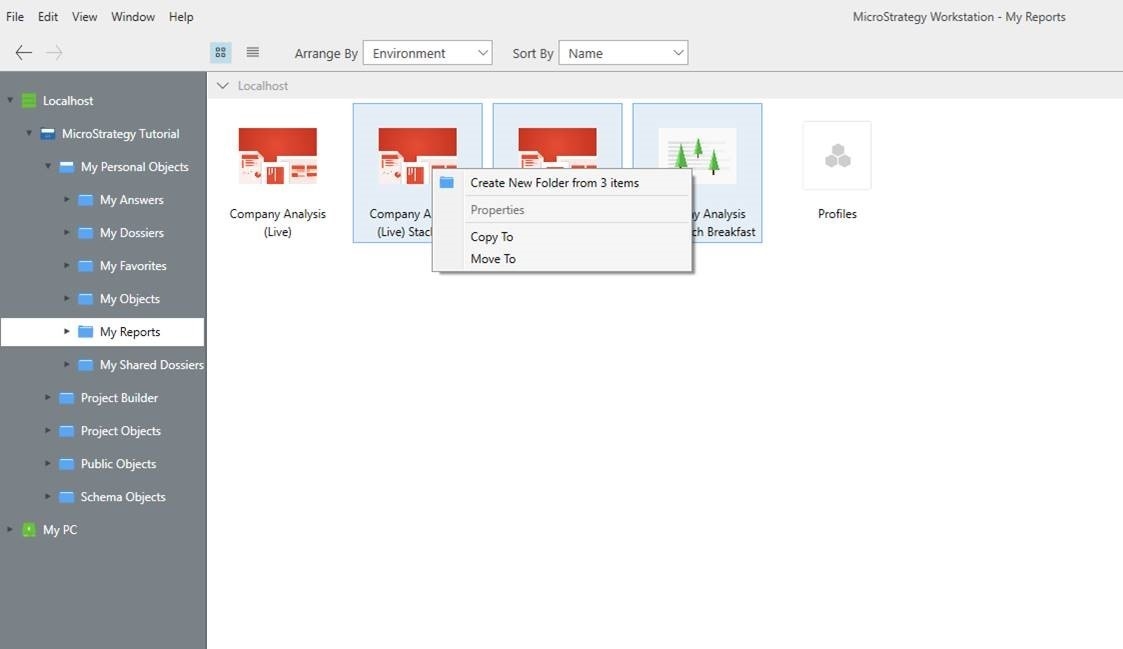
  3. Now, select two dossiers.
  4. Right-click, then notice the Delete option is not present.
ka0PW0000001JPQYA2_0EM44000000YU3J.jpeg

Why is this happening?
This is a limitation of Strategy Desktop and Strategy Workstation 10.10. The Strategy development will be working on upgrades for the future versions of the products.
Status
ACKNOWLEDGED   IN-PROGRESS   SOLVED   (Version: TBD)
Currently being reviewed by Strategy to be enhanced in an upcoming Strategy releases.
Next Steps
Users need to delete the dossiers one by one until the issue is further reviewed. 
 

  1. Select the dossiers you wish to delete.
  2. Change the View Mode to the Folder View.
  3. Right-click on one dossier, then the Delete option.
  4. Continue the process until you have deleted all dossiers.


Have other questions? Feel free to start a discussion or reach out to your Support liaison to open a case!
 
Want to upgrade to Strategy 2019? Visit the Strategy website!


Comment

0 comments

Details

Knowledge Article

Published:

February 22, 2018

Last Updated:

March 21, 2024