SYMPTOM:
Users receive an error message when attempting to run user scripts in Strategy Command Manager. For example, TestUser has "User must change password at next login" selected, as shown below:
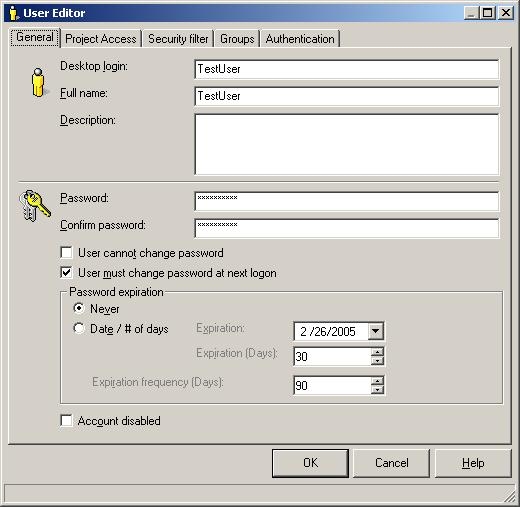
The Administrator would now like to prevent the user from changing their password by running the following script in the Command Manager:
ALTER USER "TestUser" PASSWORD "19eighty2" ALLOWCHANGEPWD FALSE;
When executing this script, however, the following error messages appear:
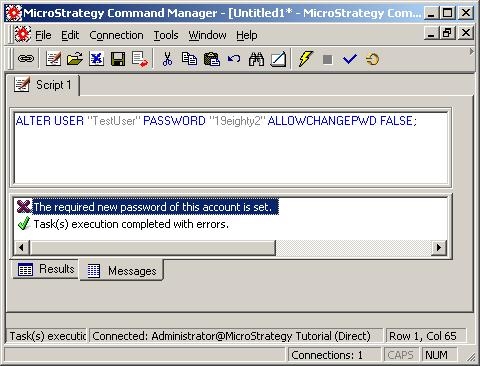
The required new password of this account is set.
Task(s) execution completed with errors.
CAUSE:
Since TestUser is set to be prompted to change their password the next time they login, Strategy Developer cannot enable the option disallow users from changing their passwords because there is a conflict. In Strategy Developer, when clicking on the "User cannot change password" option, the "User must change password at next login" option will be grayed out. However, Command Manager solely changes settings, and without Developer open, there is no trigger to have the "User must change password at next login" option grayed out automatically as it is when changed in the User Editor.
ACTION:
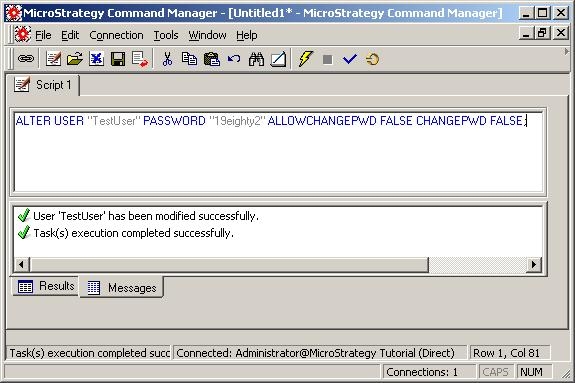
Rework the Command Manager script so that it will change the "User must change password at next login" option to FALSE, such as in the following example:
ALTER USER "TestUser" PASSWORD "19eighty2" ALLOWCHANGEPWD FALSE CHANGEPWD FALSE;