EducationSoftwareStrategy.com
StrategyCommunity

Knowledge Base

Product

Community

Knowledge Base

TopicsBrowse ArticlesDeveloper Zone

Product

Download SoftwareProduct DocumentationSecurity Hub

Education

Tutorial VideosSolution GalleryEducation courses

Community

GuidelinesGrandmastersEvents
x_social-icon_white.svglinkedin_social-icon_white.svg
Strategy logoCommunity

© Strategy Inc. All Rights Reserved.

LegalTerms of UsePrivacy Policy
  1. Home
  2. Topics

KB11363: “No function or procedure was found with the specified name (ROUND) and compatible arguments” error message appears when attempting to use the Round2 function against a DB2 UDB Warehouse.


Stefan Zepeda

Salesforce Solutions Architect • Strategy


“No function or procedure was found with the specified name (ROUND) and compatible arguments” error message appears when attempting to use the Round2 function against a DB2 UDB Warehouse.

SYMPTOM:
Users receive an error message when attempting to use the Round2 function against a DB2 UDB Warehouse. Consider the following metric definition that uses the Round2 function which will be performed against a DB2 UDB warehouse:
 
Round2 Metric
Level: Report
Condition: Nothing
Transformation: Nothing

ka02R000000kXQJQA2_0EM440000002Fli.jpeg

 
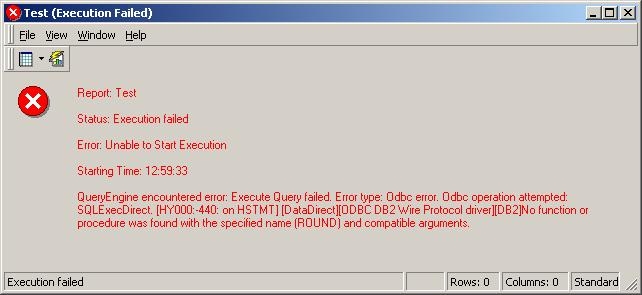
However, when using this metric on a report calculated at any level, users receive the following error message:
 

ka02R000000kXQJQA2_0EM440000002Flm.jpeg

 
QueryEngine encountered error: Execute Query failed. Error type: Odbc error. Odbc operation attempted: SQLExecDirect. No function or procedure was found with the specified name (ROUND) and compatible arguments.
CAUSE:
Notice in the SQL below (from the report above) that the precision of the Round2 Metric has been changed from '2' to '2.0':
 

ka02R000000kXQJQA2_0EM440000002Flk.jpeg


select a11.EMP_ID EMP_ID,
  max(a12.EMP_LAST_NAME) EMP_LAST_NAME,
  max(a12.EMP_FIRST_NAME) EMP_FIRST_NAME,  
  ROUND(sum(a11.TOT_DOLLAR_SALES), 2.0) WJXBFS1
from ITEM_EMP_SLS a11
  join LU_EMPLOYEE a12
  on (a11.EMP_ID = a12.EMP_ID)
group by a11.EMP_ID 
 
By default, the SQL Engine generates this extra ".0" precision which is not an acceptable syntax for the Round function for DB2 UDB.
 
ACTION:
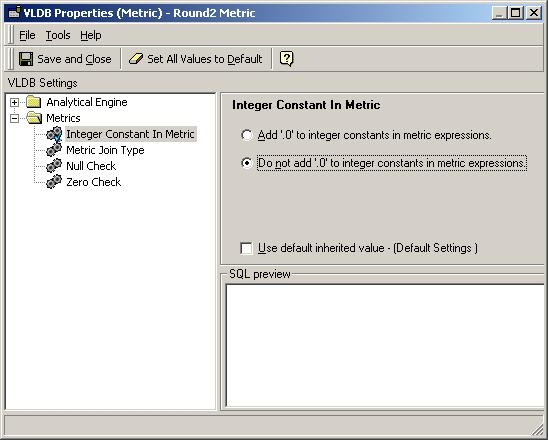
Open the Round2 Metric in the Metric Editor and go to Tools > Advanced Settings > VLDB Properties. Once there, expand the "Metrics" folder and click on the "Integer Constant in Metric" option. Uncheck the "Use default inherited value" and click the bullet option titled "Do not add '.0' to integer constants in metric expressions" so that the SQL Engine does not use the extra .0 in the expression:

ka02R000000kXQJQA2_0EM440000002Flr.jpeg

 
Re-execute the report and the correct results will be displayed:

ka02R000000kXQJQA2_0EM440000002Flg.jpeg


Comment

0 comments

Details

Knowledge Article

Published:

June 15, 2017

Last Updated:

June 15, 2017