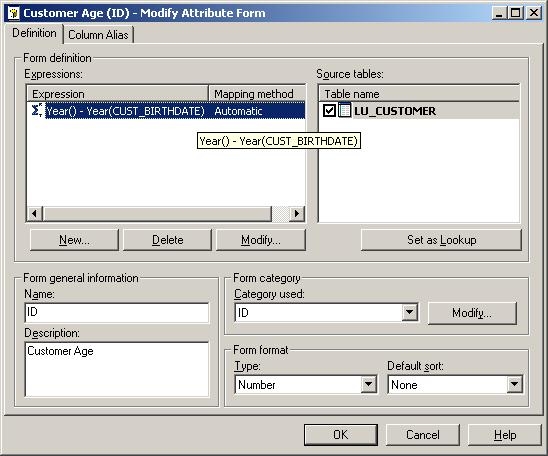
The following illustration shows the Customer Age attribute provided in the Strategy Tutorial project:
Sql
Year() - Year(CUST_BIRTHDATE)
Notice that the above expression for the ID to calculate the customer's age does so by taking the current year found by Year() and then subtracts it by the year that is extracted from the CUST_BIRTHDATE by Year(CUST_BIRTHDATE). However, this formula does not take into consideration what the current day is in relation to the customer's date of birth. It will overestimate the age by one year if the year boundary has been crossed but the customer's birthdate in the new year has not been reached.
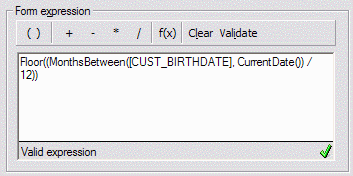
To compare the current date, including Day and Month, with the customer's specific date of birth, internal Strategy functions may be used:
Sql
Floor((MonthsBetween([CUST_BIRTHDATE], CurrentDate()) / 12))
If a report comparing the two customer age formulas is run on June 26, 2009, it shows that the MonthsBetween formula is one less for customers whose birthdate has not occurred yet in 2009, e.g., Alen Aaby. Customers with a birthdate earlier in the year have the same result for both, as expected.
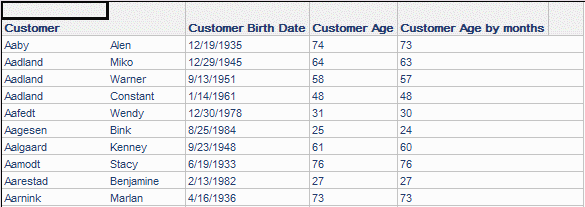
SQL generated for this report is as follows. The MonthsBetween portion is shown in boldface.
select distinct a11.CUSTOMER_ID CUSTOMER_ID,
a11.CUST_LAST_NAME CUST_LAST_NAME,
a11.CUST_FIRST_NAME CUST_FIRST_NAME,
a11.CUST_BIRTHDATE CUST_BIRTHDATE,
(DATEPART(YEAR, GETDATE()) - DATEPART(YEAR, a11.CUST_BIRTHDATE)) CUST_AGE,
FLOOR(((DATEDIFF(MM, a11.CUST_BIRTHDATE, GETDATE()) - CASE WHEN DAY(a11.CUST_BIRTHDATE) > DAY(GETDATE()) THEN 1 ELSE 0 END) / 12)) AGE_YEARS
from LU_CUSTOMER a11
Some databases may not directly support the Strategy MonthsBetween function. For these databases, it will be necessary to construct an equivalent custom SQL expression for the database platform and write it into an ApplySimple.
