EducationSoftwareStrategy.com
StrategyCommunity

Knowledge Base

Product

Community

Knowledge Base

TopicsBrowse ArticlesDeveloper Zone

Product

Download SoftwareProduct DocumentationSecurity Hub

Education

Tutorial VideosSolution GalleryEducation courses

Community

GuidelinesGrandmastersEvents
x_social-icon_white.svglinkedin_social-icon_white.svg
Strategy logoCommunity

© Strategy Inc. All Rights Reserved.

LegalTerms of UsePrivacy Policy
  1. Home
  2. Topics

KB11399: How to remove the timestamp on the file name in MicroStrategy Narrowcast 9.x - 10.x


Community Admin

• Strategy


This article explains how to remove the timestamp from the file name for File services in MicroStrategy Narrowcast 9.x - 10.x.

By default, the names of the files delivered by Strategy Narrowcast Server contain a timestamp, as shown below:
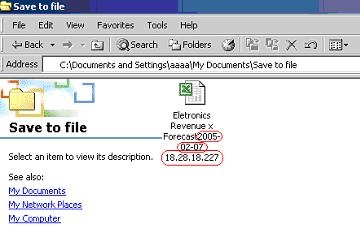
ka04W000000OhToQAK_0EM440000002BjO.jpeg

 
In order to remove this timestamp from the file name, follow the steps below:
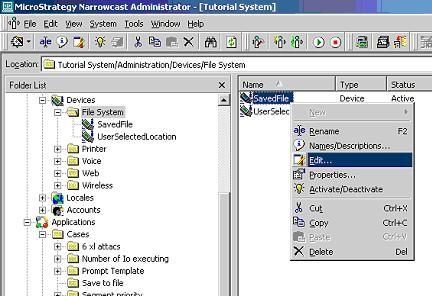
  • Edit the File Device that has been used to deliver the File:
ka04W000000OhToQAK_0EM440000002BjL.jpeg
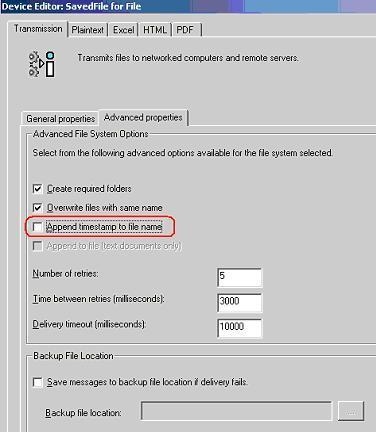
  • Uncheck the box that says 'Append timestamp to file name,' as shown below:
ka04W000000OhToQAK_0EM440000002BjM.jpeg
  • Close the Device Editor and launch the Service again.

 
Note that the timestamp is no longer part of the file name:
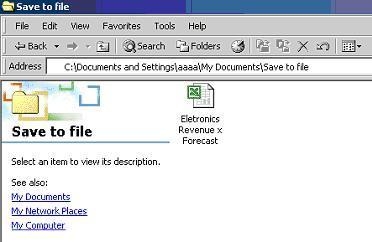
ka04W000000OhToQAK_0EM440000002BjT.jpeg

 
There is a second location for this setting. It is at the subscription set level:
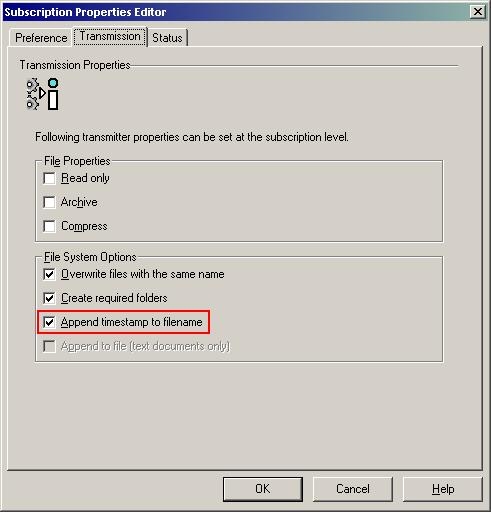
  1. Edit the subscription set for the service in question.
  2. Double-click the subscribed address for the service.
  3. Select the Transmission tab.
  4. Uncheck the "Append timestamp to file name" checkbox.
ka04W000000OhToQAK_0EM440000002BjN.jpeg


Comment

0 comments

Details

Knowledge Article

Published:

May 17, 2017

Last Updated:

May 17, 2017