EducationSoftwareStrategy.com
StrategyCommunity

Knowledge Base

Product

Community

Knowledge Base

TopicsBrowse ArticlesDeveloper Zone

Product

Download SoftwareProduct DocumentationSecurity Hub

Education

Tutorial VideosSolution GalleryEducation courses

Community

GuidelinesGrandmastersEvents
x_social-icon_white.svglinkedin_social-icon_white.svg
Strategy logoCommunity

© Strategy Inc. All Rights Reserved.

LegalTerms of UsePrivacy Policy
  1. Home
  2. Topics

KB11430: "Cannot save to path …" error message appears when saving email output to a local file in MicroStrategy Narrowcast Server 9.x


Community Admin

• Strategy


SYMPTOM:
Enabling the Email ITM to either "Save to File" or "Do Both" results in the following error messages in the DELogs and the emails not being saved to the designated folder.
 
After a service is activated, the following error is noted in the DELog file:
 
:4076:Cannot save to path "\\?\C:\SavedMail\Here is your report name-4587AD4F-C919-49E3-BDE7-F5BF95DE0355.eml". Last error was: 0
:2792:SendMail partially failed. (code: 85003). The message has been added to the queue, but it cannot be saved to disk.
CAUSE:
This issue occurs when the folder defined in the Email ITM "save to file" setting does not exist.
 
ACTION:
Determine the path being used by the email ITM by performing the following steps:
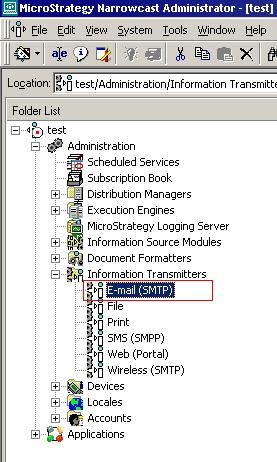
 

  • Open the Narrowcast Administration Console.
  • Expand Administration.
  • Expand Information Transmitters.
  • Right-click on email (SMTP):
ka04W000000OdHpQAK_0EM440000002Bl0.jpeg
  • Select Edit.
  • Select the Message Output tab:
ka04W000000OdHpQAK_0EM440000002Bl2.jpeg
  • Note the path specified in the setting.
  • Open Windows Explorer and navigate to the path specified in the E-Mail ITM and create a new folder with the name specified in the path.

Comment

0 comments

Details

Knowledge Article

Published:

June 22, 2017

Last Updated:

June 22, 2017