EducationSoftwareStrategy.com
StrategyCommunity

Knowledge Base

Product

Community

Knowledge Base

TopicsBrowse ArticlesDeveloper Zone

Product

Download SoftwareProduct DocumentationSecurity Hub

Education

Tutorial VideosSolution GalleryEducation courses

Community

GuidelinesGrandmastersEvents
x_social-icon_white.svglinkedin_social-icon_white.svg
Strategy logoCommunity

© Strategy Inc. All Rights Reserved.

LegalTerms of UsePrivacy Policy
  1. Home
  2. Topics

KB11440: “A group of facts that need extension do not have a common part in their fact entry levels...” error message appears when users execute a report after adding a new Metadata Partition table in MicroStrategy.


Community Admin

• Strategy


This article describes an issue that can happen with partitioned fact tables

SYMPTOM:
 
When users execute a report after adding a new Metadata Partition, the following error message appears:
SQLEngine got an Exception from DFC: Engine Logic: A group of facts that need extension do not have a common part in their fact entry levels.
Error in Process method of Component: SQLEngineServer, Project X, Job xyz, Error Code= -2147212800.
To reproduce this issue, consider the following scenario:
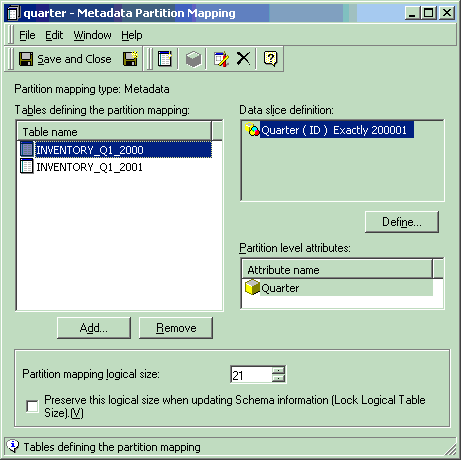
 

  • A new Metadata Partition Mapping is added to the project:
ka04W000000OhddQAC_0EM440000002Fls.gif
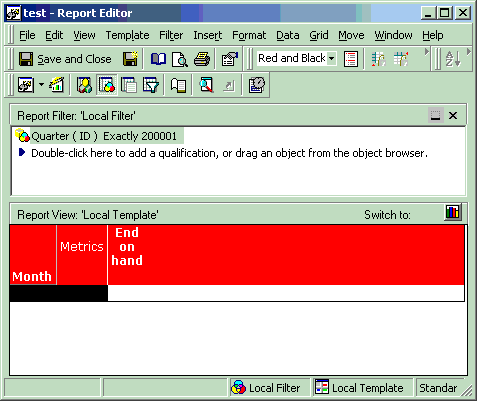
  • After updating Schema, an existing report is executed:
ka04W000000OhddQAC_0EM440000002Flh.gif
  •  
    Note that this report ran successfully before the addition of the Metadata Partition.
     
  • The report errors out with the error message described above.
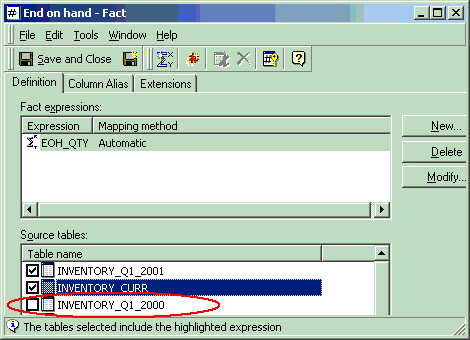
  • Upon editing the fact on which the Metric 'End on Hand' metric is based, the user sees that the tables used in the Metadata Partition have not been selected as a source table:
ka04W000000OhddQAC_0EM440000002Flq.gif

CAUSE:
 
The facts that the metrics are based on do not have all the Metadata Partitioning Tables selected as source tables. Performing an 'Update schema' does not resolve this issue, nor does running Scan MD.
 
ACTION:
 
To resolve this issue, select all of the tables used to define the Metadata Partition Mapping as the source tables for the Fact. To do this, perform the steps below:
 

  1. Open the Fact in the Fact Editor.
  2. In the source tables window, select the tables used in Metadata Partition. In the above example, select the Inventory_Q1_2000 as a source table.
  3. Update Schema and re-execute the report.

Comment

0 comments

Details

Knowledge Article

Published:

May 4, 2017

Last Updated:

May 4, 2017