EducationSoftwareStrategy.com
StrategyCommunity

Knowledge Base

Product

Community

Knowledge Base

TopicsBrowse ArticlesDeveloper Zone

Product

Download SoftwareProduct DocumentationSecurity Hub

Education

Tutorial VideosSolution GalleryEducation courses

Community

GuidelinesGrandmastersEvents
x_social-icon_white.svglinkedin_social-icon_white.svg
Strategy logoCommunity

© Strategy Inc. All Rights Reserved.

LegalTerms of UsePrivacy Policy
  1. Home
  2. Topics

KB11458: "An existing file with the same name is overwritten." error message appears in the logs when a service in MicroStrategy Narrowcast Server fails to deliver to a file location.


Community Admin

• Strategy


This knowledge base article explains why "An existing file with the same name is overwritten." error message appears in the logs when a service in MicroStrategy Narrowcast Server fails to deliver to a file location.

SYMPTOM:
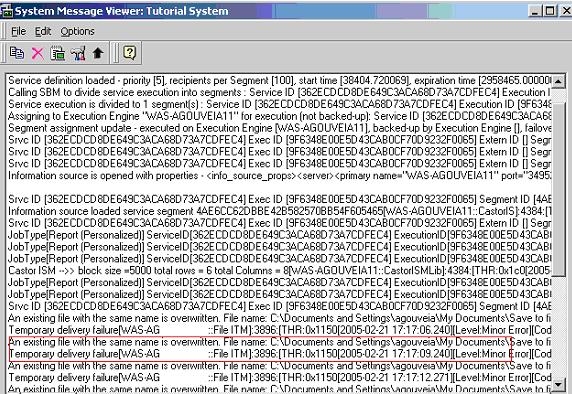
A service in Strategy Narrowcast Server fails to deliver to a file location, and the following messages are found in the log:
ka04W000000OcywQAC_0EM440000002Bje.jpeg


An existing file with the same name is overwritten.
Temporary delivery failure:3572:
CAUSE
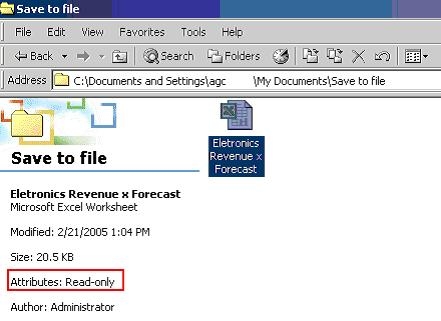
This issue occurs when a Read only file with the same name as the one being generated is already stored in the destination folder:

ka04W000000OcywQAC_0EM440000002Bjg.jpeg

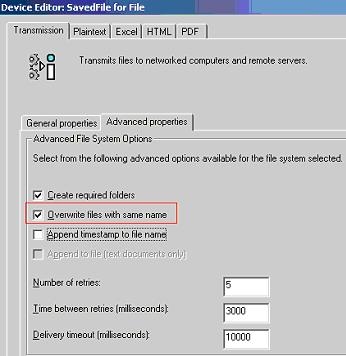
'Read only' files cannot be overwritten and even if the File Device used by the recipient is configured to 'Overwrite Files with the same name,' a conflict will occur and the file will not be generated.
ka04W000000OcywQAC_0EM440000002Bja.jpeg

 
ACTION:
In order to generate the new file, rename, delete or move the existing one to a new location. Alternately, rename the new file or append a timestamp to the file name. This way, the names for the two files will not be the same and they will be able to be stored in the same location.


Comment

0 comments

Details

Knowledge Article

Published:

June 23, 2017

Last Updated:

June 23, 2017