SYMPTOM:
When a Report Services document is executed, the document errors out with following message:
Dataset (4A-INVSSP#3-State Assessed Including) execution failed:
QueryEngine encountered error: Execute Query failed. Error type: Odbc error. Odbc operation attempted: SQLExecDirect. SQL0519N The PREPARE statement identifies the SELECT or VALUES statement of the open cursor 'SQLCUR4.' SQLSTATE=24506 Error in Process method of Component: QueryEngineServer, Project 1, Job 65829, Error Code= -2147212544.
CAUSE:
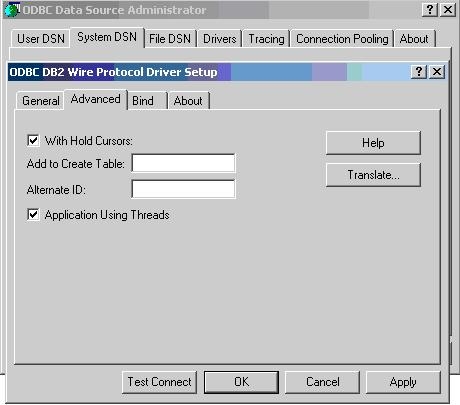
This issue occurs because of a setting on the ODBC driver. In DB2, by default, the CURSORHOLD property is enabled in ODBC DSN for DB2.
ACTION:
To resolve this issue, click on the Advanced Tab and uncheck the With Hold Cursors box, shown below:
Warning:
Making the above change to the ODBC DSN for DB2 metadata should not have any effect on any other Strategy applications. Check with the DBA to ensure that this setting does not affect any other non-Strategy applications.
