EducationSoftwareStrategy.com
StrategyCommunity

Knowledge Base

Product

Community

Knowledge Base

TopicsBrowse ArticlesDeveloper Zone

Product

Download SoftwareProduct DocumentationSecurity Hub

Education

Tutorial VideosSolution GalleryEducation courses

Community

GuidelinesGrandmastersEvents
x_social-icon_white.svglinkedin_social-icon_white.svg
Strategy logoCommunity

© Strategy Inc. All Rights Reserved.

LegalTerms of UsePrivacy Policy
  1. Home
  2. Topics

KB11688: When Grid Character sets are selected as ‘Chinese GB2312’ for ‘Simplified Chinese’ under the International Tab in MicroStrategy Developer (formerly Desktop) Preferences, the default Font type selected automatically displays incorrect text.


Stefan Zepeda

Salesforce Solutions Architect • Strategy


In MicroStrategy Developer (formerly Desktop) Preferences, when the Grid Character Set is selected as 'Chinese GB2312' for Simplified Chinese, the default font type to be used in the Grid is automatically selected. However, when the report that contains the Simplified Chinese Text is executed, the text appears incorrectly using the default settings.

SYMPTOM:
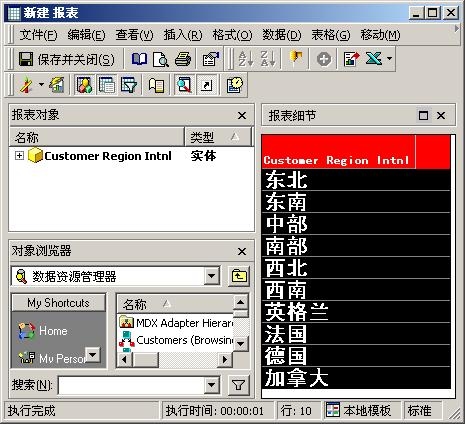
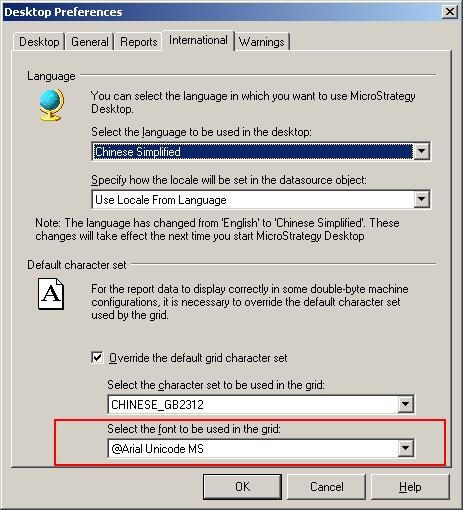
In Strategy Desktop Preferences, when the Grid Character Set is selected as 'Chinese GB2312' for Simplified Chinese, the default font type to be used in the Grid is automatically selected. However, when the report that contains the Simplified Chinese Text is executed, the text appears incorrectly using the default settings.
 
Default Font Type selected by Strategy
 

ka02R000000kY8zQAE_0EM440000002FjN.jpeg

 
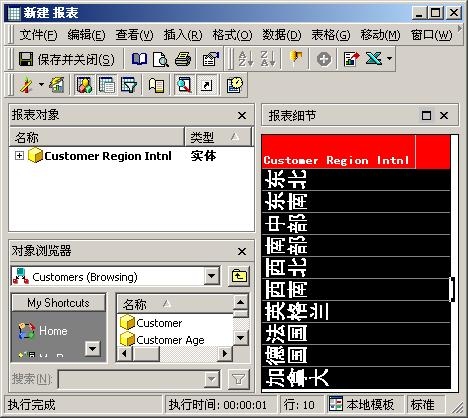
Text displayed incorrectly on the Grid (note Chinese text rotated 90-degrees)
 

ka02R000000kY8zQAE_0EM440000002FjL.jpeg

 
CAUSE:
When the Grid character set is selected as 'Chinese GB2312' for 'Simplified Chinese,' the default Font type selected '@Arial Unicode MS' is incorrect which results in displaying the Simplified Chinese text rotated by 90-degrees.
 
ACTION:
To resolve this issue, perform the following steps:
 

  • Follow the instructions in Knowledge Base document KB4000-7X0-0476 to override the default grid character set options under the International Tab in Desktop Preferences.
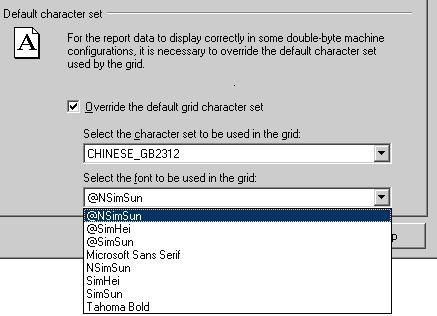
  • Make sure to select correct Simplified Chinese Font type from the drop-down list for "Select the font to be used in the grid" such as 'NSimSun,' 'SimHei,' or 'SimSun' fonts:
ka02R000000kY8zQAE_0EM440000002FjJ.jpeg
  • In the drop-down list for the Simplified Chinese Font types there are two versions of three Simplified Chinese fonts ("Sim") which exist with very similar names:
     
    Font type version with "@" as a prefix:
     
    • @NSimSun
    • @SimHei
    • @SimSun
  •  
    Font type version without any prefix:
     
    • NSimSun
    • SimHei
    • SimSun
  • Selecting the correct font type such as 'NSimSun' will display the Text as expected:
ka02R000000kY8zQAE_0EM440000002FjI.jpeg

 
Notes:

  • DO NOT specify the "@" fonts, since these font types print Chinese text rotated 90-degrees ("vertical printing" for landscape format).

Comment

0 comments

Details

Knowledge Article

Published:

June 10, 2017

Last Updated:

June 10, 2017