EducationSoftwareStrategy.com
StrategyCommunity

Knowledge Base

Product

Community

Knowledge Base

TopicsBrowse ArticlesDeveloper Zone

Product

Download SoftwareProduct DocumentationSecurity Hub

Education

Tutorial VideosSolution GalleryEducation courses

Community

GuidelinesGrandmastersEvents
x_social-icon_white.svglinkedin_social-icon_white.svg
Strategy logoCommunity

© Strategy Inc. All Rights Reserved.

LegalTerms of UsePrivacy Policy
  1. Home
  2. Topics

KB11690: What are the request timeout settings for MicroStrategy Office?


Community Admin

• Strategy


What are the request timeout settings for MicroStrategy Office

Executing a large report in Strategy Office may cause a request timeout error message and can be caused by any delay between a request from a Strategy Office Client and the response from the Web Services Server.
 
There are four primary settings that can govern the allowable length of this delay:
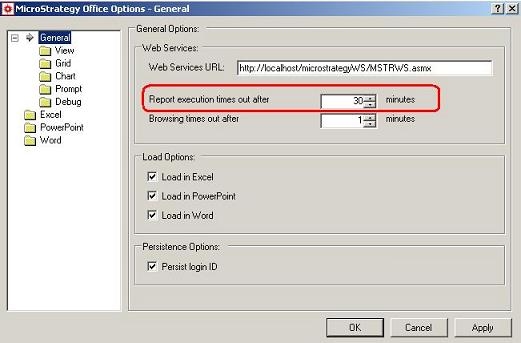
 

  • The report execution timeout on the client machine located in the General Office Configuration menu, as shown below:
ka04W000000OhiuQAC_0EM4400000028zw.jpeg
  •  
    By default, this setting is 30 minutes. This value is specific to all report execution on the client machine.
     
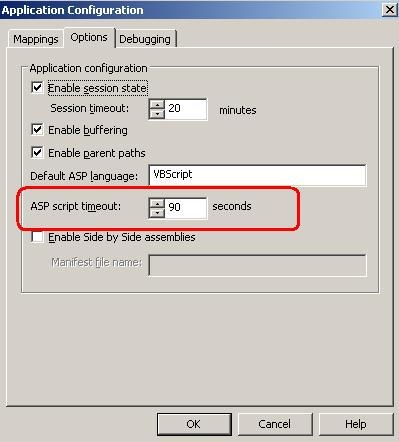
  • The ASP script timeout setting on the Internet Information Server (IIS), as illustrated below. It can be accessed from the properties menu by clicking the Configuration button and navigating to the App Options tab:
ka04W000000OhiuQAC_0EM4400000028zv.jpeg
  •  
    NOTE:
     
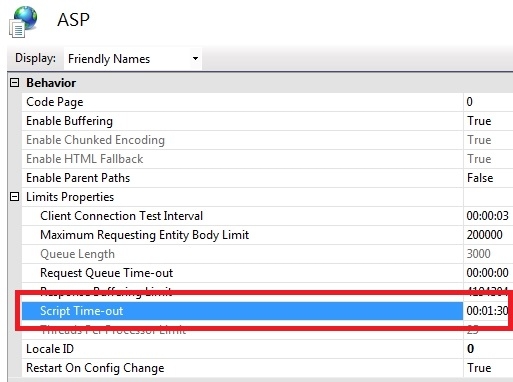
    When using IIS7.X as an application server, the setting is located in the ASP section:

ka04W000000OhiuQAC_0EM4400000028zy.jpeg
  •  By default, this setting is 90 seconds. This effects scripts running from the Web Services virtual directory.
     
  • In the Web.config file on the Web Services server, there is a request timeout key, as shown below. By default, this file is located at c:\Program Files\Strategy\Web Services.
    ...
    <!-- Specified in seconds -->
    <add key="REQUESTTIMEOUT" value="300" />
    ...
    The default value is 300 seconds. This value is an application-level setting that effects all requests.
     
  • The following keys can be added to the web.config file, just before the </system.web> tag:
    <httpRuntime executionTimeout="3600" appRequestQueueLimit="1000"/>
    By default, these values are not present in the web.config file. The default settings are read from the machine.config file which controls system-level settings. However, the machine.config can be overridden using the machine.config file.
     

Comment

0 comments

Details

Knowledge Article

Published:

April 18, 2017

Last Updated:

April 18, 2017