SYMPTOM:
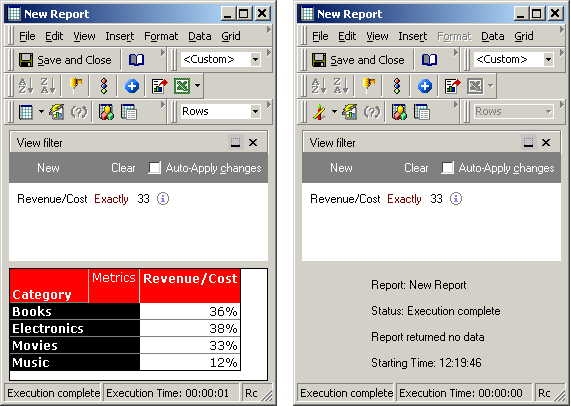
View filter evaluations return no data when using the 'Exactly' criterion. The value of the metric defined in the view filter exists on the report, but after applying the view filter, no data is returned.
In the screen shot below, a View Filter has been created to filter on the metric value of 33% present on the grid. However, after applying the filter, the report returns no data:
CAUSE:
This behavior occurs when the values returned by the metric to the user at the Presentation layer are formatted without decimal places. View filters, on the other hand, are not applied at the presentation layer. For this reason, the filter looks for an integer value that is the result of rounding and therefore is not present in the dataset.
ACTION:
Users should ensure that decimal places are included in the value used with the 'Exactly' criterion in the View Filter.
