Strategy adopts multi-pass logic to determine the execution plan for a report. This means that every metric is evaluated in separate SQL passes.
Outer Joins come into play when Strategy Engine merges the results from all SQL passes into one report. For a multi-pass report, different Outer Join behaviors can give the user completely different results.
In addition, report metrics can be of different types which can, in some cases, influence the result of the outer join (see Formula Join Type at Compound/Split Metrics Level).
A- Metric types
A report can have many compound metrics and split metrics, while the compound metrics can have split metrics in its expression.
This scenario may cause Strategy Engine to generate more than one pass of SQL to calculate the report.
Aggregate/Simple Metrics:
Aggregate/Simple Metrics are the simplest of metrics, aggregating one fact to a certain level. For example:
Sum(Revenue) {~+}
Sum(Profit) {~+}
Sum(Revenue) {Region+}
Split Metrics:
Split metrics are simple metrics with more than one fact in their expression which come from different fact tables. For example:
(SUM(Fact1) - SUM(Fact2)) {+~}
Compound Metrics:
Compound Metrics are metrics that are made by combining one or more other metrics using one or more mathematical operators. For example:
(Sum(Profit) {~+} / Sum(Revenue) {~+} )
(Sum(Revenue) {~+} / Sum(Revenue) {Region+}
B- Metric and Formula Join Type
In Strategy, there are two settings that users can access to control Outer Join behavior: Formula Join Type and Metric Join Type.
Metric Join Type:
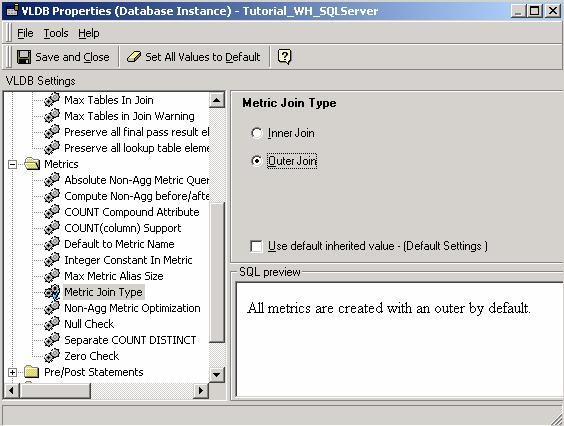
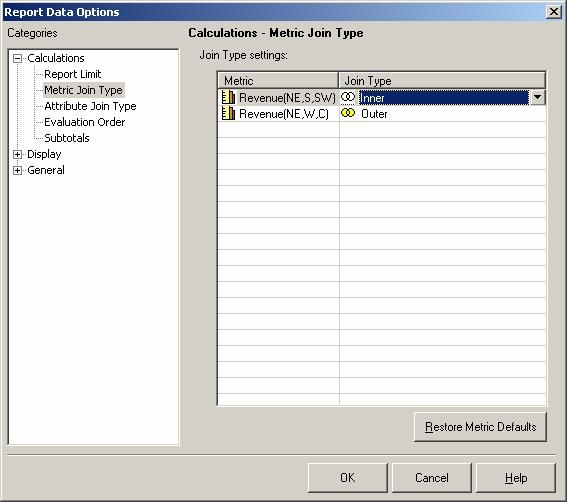
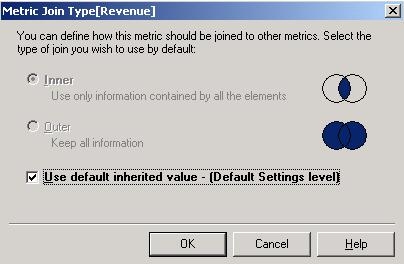
Formula Join Type:
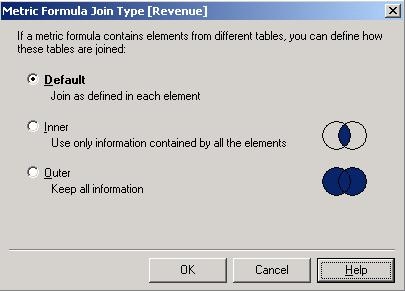
Only at Compound/Split Metrics Level
C- Metrics Join Type Hierarchy
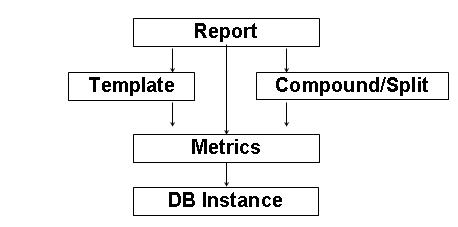
The following schema shows which setting takes precedence when set at different levels.
For example, setting Metric Join type to "Outer" at the report level (Metric editor > Tool > Metric Join Type) overwrites the Metric Join Type set at the Database Instance Level:
The subject of Outer Joins is a very broad one, however, as a continuation of the topics covered in this article, users might find it useful to refer to the following Strategy Knowledge Base document:
