EducationSoftwareStrategy.com
StrategyCommunity

Knowledge Base

Product

Community

Knowledge Base

TopicsBrowse ArticlesDeveloper Zone

Product

Download SoftwareProduct DocumentationSecurity Hub

Education

Tutorial VideosSolution GalleryEducation courses

Community

GuidelinesGrandmastersEvents
x_social-icon_white.svglinkedin_social-icon_white.svg
Strategy logoCommunity

© Strategy Inc. All Rights Reserved.

LegalTerms of UsePrivacy Policy
  1. Home
  2. Topics

KB11838: How to create an Excel document with Macros which run upon opening the file in Microstrategy Narrowcast Server


Community Admin

• Strategy


How to create an Excel document with Macros which run upon opening the file in MicroStrategy Narrowcast Server.

While Strategy Narrowcast Server does not support server-side macro execution, macros can be imported into Narrowcast Server and used as Excel templates. The macros will then be executed when the Excel file is opened. The following steps describe a basic technique of creating a macro that executes automatically when the Excel file is opened:
 

  • Create a new, blank Excel document.
  • Create and save the macro to be executed when the subscriber opens the Excel file.
  • Edit the macro by navigating to Tools > Macro >Macros.
  • Highlight the macro and click "Edit," as shown below:
ka04W00000148XTQAY_0EM440000002FjT.jpeg
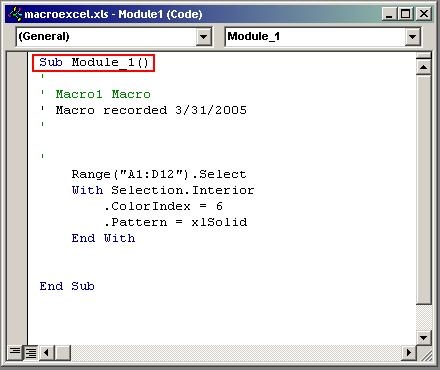
  • Locate the beginning of the subroutine:
ka04W00000148XTQAY_0EM440000002FjY.jpeg
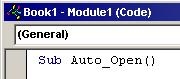
  • Edit the subroutine name to the following: Sub Auto_Open()
ka04W00000148XTQAY_0EM440000002FjU.jpeg
  • Save and Close the Excel Sheet.
  • Import the Excel file into Narrowcast as an Excel template.
  • Edit the Service to use the new Excel sheet recently created.

Comment

0 comments

Details

Knowledge Article

Published:

June 5, 2017

Last Updated:

June 5, 2017