EducationSoftwareStrategy.com
StrategyCommunity

Knowledge Base

Product

Community

Knowledge Base

TopicsBrowse ArticlesDeveloper Zone

Product

Download SoftwareProduct DocumentationSecurity Hub

Education

Tutorial VideosSolution GalleryEducation courses

Community

GuidelinesGrandmastersEvents
x_social-icon_white.svglinkedin_social-icon_white.svg
Strategy logoCommunity

© Strategy Inc. All Rights Reserved.

LegalTerms of UsePrivacy Policy
  1. Home
  2. Topics

KB11920: Report cache is invalidated and report executes again after modifying the report format in MicroStrategy Developer 9.4.x - 10.x


Stefan Zepeda

Salesforce Solutions Architect • Strategy


This article explains that in MicroStrategy 9.4.x - 10.x, any change in a report object that results in a version ID modification will cause an existing report cache to get invalidated

SYMPTOM
After making formatting changes, the report cache is lost and the report is executed again even though the data has not been modified.
 
STEPS TO REPRODUCE
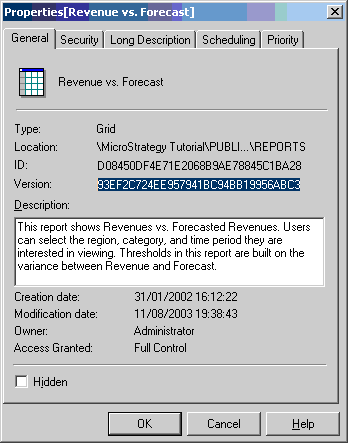
  • Confirm the report version under Report Properties as shown in the image below, and open the report in Strategy Developer.
     
ka02R000000kVofQAE_0EM440000002Bi2.gif
  • Make formatting changes in Strategy Developer. Verifying the report version again shows that the version has changed as shown in the image below:
     
ka02R000000kVofQAE_0EM440000002Bhs.gif

Since the version has changed, the cache is invalidated. Therefore, the report does not hit the cache but is executed again.
 
CAUSE
This is working as designed. Formatting changes result in modification of the version ID of the object. The existing cache is invalidated because the report version ID has changed.


Comment

0 comments

Details

Knowledge Article

Published:

May 23, 2017

Last Updated:

May 23, 2017