EducationSoftwareStrategy.com
StrategyCommunity

Knowledge Base

Product

Community

Knowledge Base

TopicsBrowse ArticlesDeveloper Zone

Product

Download SoftwareProduct DocumentationSecurity Hub

Education

Tutorial VideosSolution GalleryEducation courses

Community

GuidelinesGrandmastersEvents
x_social-icon_white.svglinkedin_social-icon_white.svg
Strategy logoCommunity

© Strategy Inc. All Rights Reserved.

LegalTerms of UsePrivacy Policy
  1. Home
  2. Topics

KB11939: How to place metrics in the Page-by of a Report in MicroStrategy Developer


Stefan Zepeda

Salesforce Solutions Architect • Strategy


This Technical Note describes how to place metrics in the Page-by of a Report in MicroStrategy Developer

SUMMARY:
A user may have a report that takes advantage of cross-tabulation which allows for display data at intersections. If a user would like to display one metric at a time so that the data in a report is more focused, then the metrics can be placed in the Page-by.
 
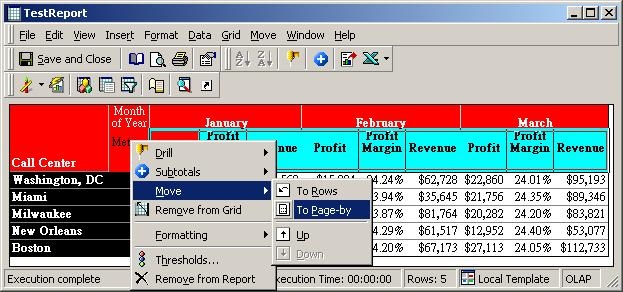
A user can place the metrics in the Page-by field by right-clicking on the word "Metrics" and then selecting Move->Page-by as shown in the image below:
ka02R000000kcgOQAQ_0EM440000002Fir.jpeg

 
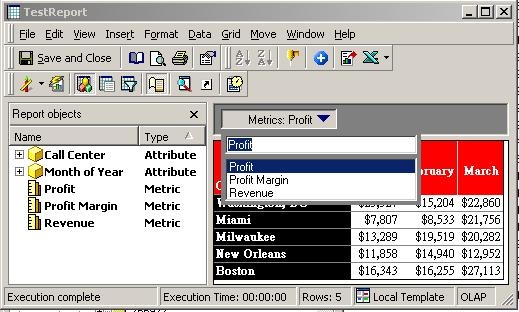
As seen in the image below, the metrics are now available in the Page-by.
ka02R000000kcgOQAQ_0EM440000002Fip.jpeg


Comment

0 comments

Details

Knowledge Article

Published:

April 4, 2017

Last Updated:

April 4, 2017