EducationSoftwareStrategy.com
StrategyCommunity

Knowledge Base

Product

Community

Knowledge Base

TopicsBrowse ArticlesDeveloper Zone

Product

Download SoftwareProduct DocumentationSecurity Hub

Education

Tutorial VideosSolution GalleryEducation courses

Community

GuidelinesGrandmastersEvents
x_social-icon_white.svglinkedin_social-icon_white.svg
Strategy logoCommunity

© Strategy Inc. All Rights Reserved.

LegalTerms of UsePrivacy Policy
  1. Home
  2. Topics

KB11998: Attribute element values appear in uppercase letters when executing reports in MicroStrategy Enterprise Manager 9.0.x


Community Admin

• Strategy


Attribute element values appear in uppercase letters when executing reports in MicroStrategy Enterprise Manager 9.0.x

SYMPTOM:
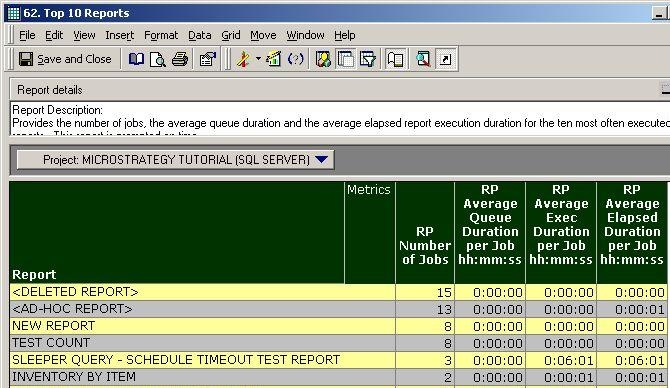
When executing a Strategy Enterprise Manager 8.1.x - 9.0.x report, the attribute element values display in uppercase rather than mixed case as shown in the image below:
 

ka04W000000OgkwQAC_0EM440000002Bh7.jpeg

 
CAUSE:
This behavior is by design. The Strategy Enterprise Manager 9.0.x data load process reads the names in uppercase from the Strategy metadata and populates the lookup tables in the Strategy Enterprise Manager data warehouse with all-uppercase object names.
 
ACTION:
Starting with Strategy Enterprise Manager 9.2.0, all lookup tables in the Strategy Enterprise Manager Warehouse are populated in mixed case. The data which is already in the lookup tables is not modified, but all the new data populated in lookup tables using Strategy Enterprise Manager 9.2.0 will be in mixed case.


Comment

0 comments

Details

Knowledge Article

Published:

June 12, 2017

Last Updated:

June 12, 2017