EducationSoftwareStrategy.com
StrategyCommunity

Knowledge Base

Product

Community

Knowledge Base

TopicsBrowse ArticlesDeveloper Zone

Product

Download SoftwareProduct DocumentationSecurity Hub

Education

Tutorial VideosSolution GalleryEducation courses

Community

GuidelinesGrandmastersEvents
x_social-icon_white.svglinkedin_social-icon_white.svg
Strategy logoCommunity

© Strategy Inc. All Rights Reserved.

LegalTerms of UsePrivacy Policy
  1. Home
  2. Topics

KB12065: Service executes despite pre-SQL that results in a divide-by-zero error in Microstrategy Narrowcast


Community Admin

• Strategy


SYMPTOM:
Strategy Narrowcast Server services can contain pre-SQL which is designed to determine whether a service should send a transmission (see KB8972 for more information). However, on some database platforms, pre-SQL that results in a divide-by-zero error is not recognized as an error. The service continues to execute and send transmissions even though running the pre-SQL statement directly against the warehouse results in an error similar to the following:
 
Fetch failed. Error type: Odbc error. Odbc operation attempted: SQLFetch. ORA-01476: divisor is equal to zero
Note: The message will vary depending on the database platform in use.
 
CAUSE:
Divide-by-zero errors are recognized at different times, depending on the database platform. In certain instances it is recognized when the SQL is sent to the database for execution, on other platforms it is recognized when the results are retrieved from the database. Oracle 9i is an example of a database platform which may experience this issue.
 
If the divide-by-zero error is recognized when retrieving the results, as opposed to when the SQL is executing, then the service will still execute.
 
ACTION:
Two approaches can be taken to ensure that Strategy Narrowcast Server responds correctly to pre-SQL that should cause a service be withheld. The two options are listed as follows:
 

  • WORKAROUND 1:
    Modify the SQL to generate an error other than a divide-by-zero error such as returning a value of zero which will be read as false.
     
  • WORKAROUND 2:
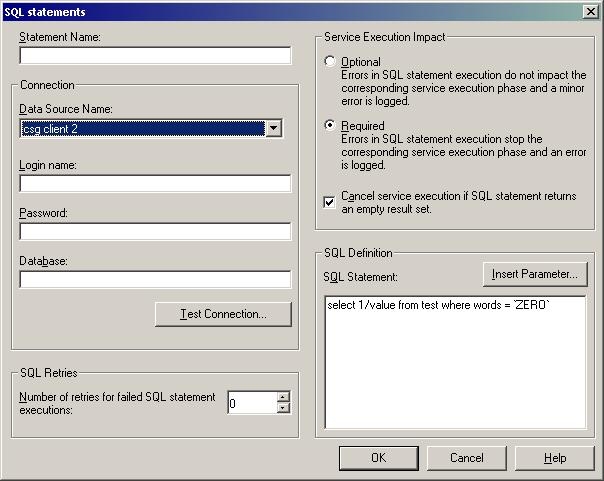
    Modify the SQL settings to ensure that a pre-SQL statement will fail if a null set is returned by following these steps:
     
    • Edit the subscription set for the service
    • Select Edit -> Pre/Post-SQL from the file menu
    • Highlight the Pre-SQL statement
    • Click the 'Edit' button
    • Check the box labeled 'Cancel service execution if SQL statement returns an empty result set' as shown in the image below
ka04W000000OeYlQAK_0EM440000002BhQ.jpeg

Comment

0 comments

Details

Knowledge Article

Published:

June 7, 2017

Last Updated:

June 7, 2017