EducationSoftwareStrategy.com
StrategyCommunity

Knowledge Base

Product

Community

Knowledge Base

TopicsBrowse ArticlesDeveloper Zone

Product

Download SoftwareProduct DocumentationSecurity Hub

Education

Tutorial VideosSolution GalleryEducation courses

Community

GuidelinesGrandmastersEvents
x_social-icon_white.svglinkedin_social-icon_white.svg
Strategy logoCommunity

© Strategy Inc. All Rights Reserved.

LegalTerms of UsePrivacy Policy
  1. Home
  2. Topics

KB12067: How to configure LDAP connectivity using Clear text (using OpenLDAP) or SSL (using OpenSSL) for MicroStrategy Intelligence Server on Linux.


Community Admin

• Strategy


This knowledge base article goes over steps to setup LDAP authentication using either cleartext or SSL to MicroStrategy Intelligence Server on Linux environments.

In order to set up LDAP authentication using either Clear text or SSL on Strategy Intelligence Server Universal 9.x-10.x on Linux the following steps need to be performed:
  • The 64 bit LDAP libraries must be present on the machine on which the Intelligence Server is running.
    • For Clear text connection, OpenLDAP (64 bit) libraries are required.
    • For SSL connection, OpenSSL (64 bit) libraries are also required.
  • Usually, both libraries are available on the Linux machines. If the libraries are not present, users should contact their system administrators to install the required openldap and openssl packages for the operating system distribution.
     
  • Strategy Intelligence Server has to be notified of the location of the above libraries.
    Usually, both are in the system path (e.g. in /lib and/or /usr/lib directories). If that is the case, no action is needed. If not, the path to the libraries can be added into the MSTR_LDAP_LIBRARY_PATH variable in the LDAP.sh file located in the $MSTR_HOME_PATH/env directory.
     
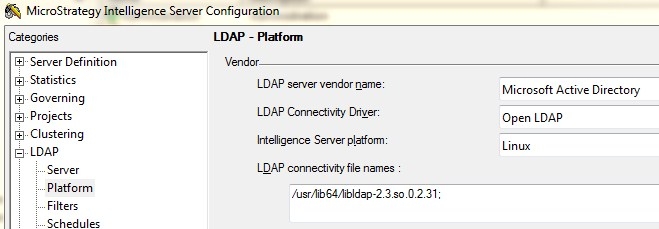
  • Ensure that the library specified in the Vendor SDK dll section is the default for Open LDAP on Linux. For Red Hat Linux the library file is "libldap.so" or the specific library name and version for that release (e.g. on Red Hat 5.3 it would be "/usr/lib64/libldap-2.3.so.0". For Suse Enterprise Linux 11 the default library file name is "/usr/lib64/libldap-2.4.so.2") as shown in the image below. Additionally, on Strategy Secure Enterprise 10.x users should be sure to use libldap_r library as discussed in the following knowledge base article KB276747: MicroStrategy Secure Enterprise 10.x may shutdown unexpectedly when using LDAP authentication on Linux Operating Systems
ka04W00000148NxQAI_0EM440000002Bhz.jpeg
  • Strategy Intelligence Server has to be restarted if a path has been added to the LDAP.sh file for this to apply.
     

SSL Connection
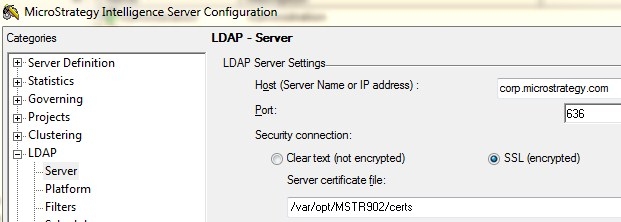
With the Strategy Intelligence Server 9.x-10.x, users only need the Certification Authority (CA) certificate for the CA used to sign the LDAP Server SSL certificate. This certificate should be placed in a folder accessible to the Intelligence Server and must be named "cacert.pem" and must be in the Base64 encoded pem format. The folder containing the file must be specified in the Intelligence Server LDAP configuration as shown in the screenshot below. 
 

ka04W00000148NxQAI_0EM440000002Bhx.jpeg


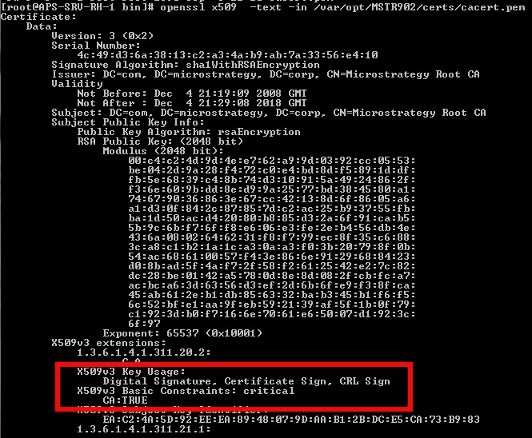
Configure the LDAP certificate setting in the Strategy Intelligence Server Definition through Strategy Desktop or Control Center by typing in the full path to the certificate files as shown in the screenshot above. The user can use openssl commands to check the validity of the CA certificate as shown below:
ka04W00000148NxQAI_0EM440000002Bhp.jpeg


Comment

0 comments

Details

Knowledge Article

Published:

May 8, 2017

Last Updated:

May 16, 2017