The MSIFileTable trace stores information retrieved by report SQL into a text file. When this file is provided to Strategy Technical Support, along with a duplicate of the project (or metadata backup), the report can be executed against the MSIFileTable. This is helpful for troubleshooting issues with report display or Analytical Engine processing.
MSIFileTables can be captured on a Strategy Developer 9.4.x-10.x-2019-2020 machine if the report is run in a two-tier connection, or a Strategy Intelligence Server 9.4.x-10.x-2019-2020 machine when running the report in a three-tier connection. Users should be aware of the following points:
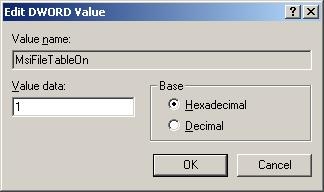
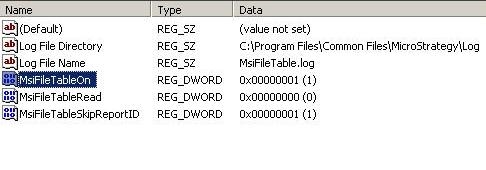
MsiFileTable logging must be enabled directly in the Registry. The configuration parameters are not available in the Strategy Diagnostics and Performance Logging tool.
WARNING: When the DSS MsiFileTable.log is enabled, large amounts of data may be logged depending on the datasets involved. This will impact performance. Disable the MsiFileTable.log immediately after obtaining the required information for troubleshooting. In order to effectively disable this log in a three-tier scenario, the Strategy Intelligence Server process will need to be restarted after setting the Registry keys back to their original values.
To enable MsiFileTable.log, complete the following steps:
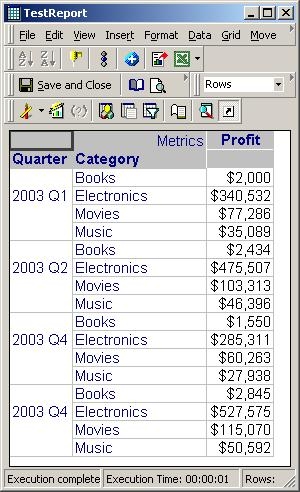
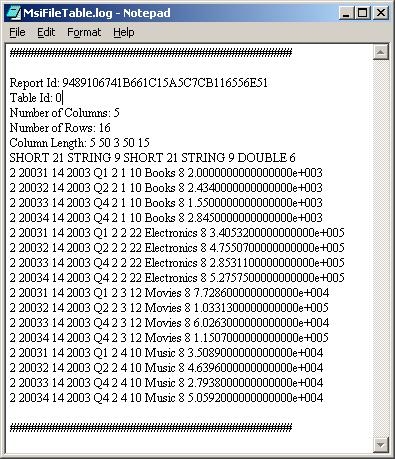
The following shows an example report that was executed and the MsiFileTable Log File that was generated for it:
To enable the MsiFileTable.log complete the following steps.
In Strategy Intelligence Server Universal environments in UNIX/Linux, the MSIFileTable Registry entries are found in the MSIReg.reg file, which is located in the Strategy home directory chosen during installation. Open this file in a text editor and search for "MSIFile" to locate the following:
"Log File Directory"="/path/to/misfile/directory"
"Log File Name"="DSS MsiFileTable.log"
"MsiFileTableOn"=dword:00000001
"MsiFileTableRead"=dword:00000000
"MsiFileTableSkipReportID"=dword:00000001
Change the MsiFileTableOn and MsiFileTableRead entries as needed, and supply the correct directory and filename. The read setting should be set to 0 while generating a file and should be set to 1 only when reading from an existing created file.
IMPORTANT: Strategy does not support the use of this method as an off-line reporting feature; the main purpose of this feature is troubleshooting.
WARNING:
Modifying registry values incorrectly may cause serious, system-wide problems that may require the re-installation of Microsoft Windows. Any edit of the registry is done at the user's own risk. Since these are user-initiated changes, they are not covered by any Strategy warranty. The user should back up the registry and/ or update an Emergency Repair Disk prior to alterations.
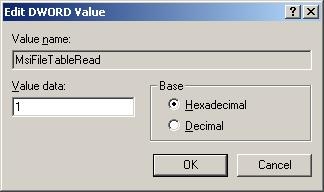
To read the MSIFileTable using a duplicate of the project, perform the following steps:
To show that the MsiFileTable is being read rather than the database, the MsiFileTable.log file has been modified to replace the word "Books" with "Food."

