EducationSoftwareStrategy.com
StrategyCommunity

Knowledge Base

Product

Community

Knowledge Base

TopicsBrowse ArticlesDeveloper Zone

Product

Download SoftwareProduct DocumentationSecurity Hub

Education

Tutorial VideosSolution GalleryEducation courses

Community

GuidelinesGrandmastersEvents
x_social-icon_white.svglinkedin_social-icon_white.svg
Strategy logoCommunity

© Strategy Inc. All Rights Reserved.

LegalTerms of UsePrivacy Policy
  1. Home
  2. Topics

KB12127: How to create a dynamic report execution service in MicroStrategy Narrowcast Server 9.x - 10.x


Community Admin

• Strategy


This document explains, through the use of an example, how to create a dynamic report execution in MicroStrategy Narrowcast Server 9.x - 10.x. The document is split into two parts, the preliminary steps that need to be completed through MicroStrategy Developer and the steps that are needed in MicroStrategy Narrowcast Server to create a dynamic report execution service.

There are two forms of dynamic execution in Strategy Narrowcast Server:

  1. Dynamic Report Execution (prompts)
  2. Dynamic Page Execution (Page-by)

This document explains, through the use of an example, how to create a dynamic report execution in Strategy Narrowcast Server 9.x - 10.x. The document is split into two parts, the preliminary steps that need to be completed through Strategy Developer and the steps that are needed in Strategy Narrowcast Server to create a dynamic report execution service.
 
STEPS REQUIRED FOR Strategy DEVELOPER

  • Create a subscription table that contains the following columns (For more information on the data types please refer to the Strategy Knowledge Base document KB10469).
ka04W000000Ohe0QAC_0EM440000002Bhb.jpeg
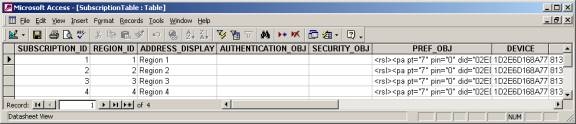
  • Populate the subscription table with the needed information as shown in the image below:
ka04W000000Ohe0QAC_0EM440000002BhP.jpeg
    • Note: AUTHENTICATION_OBJ AND SECURITY_OBJ will not be used in this example
    • This document assumes the user can obtain the PREF_OBJ. For more information on how to obtain preference object xml definition, please refer to Strategy Knowledge Base document KB37780.
    • For more information on formats of subscription information for dynamic subscription sets and where to obtain the data, refer to the Strategy Knowledge Base document KB10469.
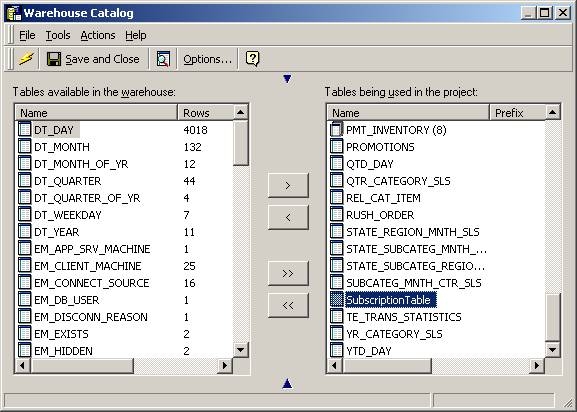
  • Import the table into the Strategy project using the Warehouse Catalog as shown in the image below:
ka04W000000Ohe0QAC_0EM440000002Bho.jpeg
  • Create one attribute (with one form each) for each column in the subscription table as shown in the image below:
ka04W000000Ohe0QAC_0EM440000002Bha.jpeg
  • Update the schema as shown in the image below:
ka04W000000Ohe0QAC_0EM440000002L31.png
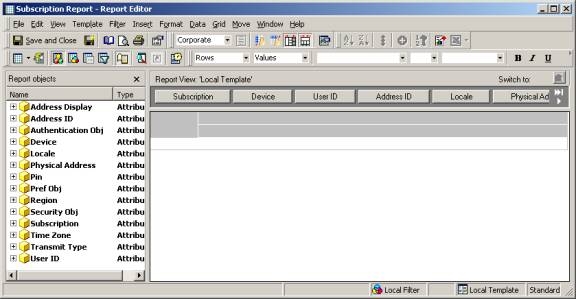
  • Create a subscription report that has all the subscription table attributes in the page-by where the first attribute is the Subscription ID attribute as shown in the image below:
ka04W000000Ohe0QAC_0EM440000002Bhh.jpeg
  • Create the content report as shown in the image below. This document will use the attribute REGION created in step 4. Note: Do not place any page-by attributes in the report since this document discusses report execution and not page-by execution.
ka04W000000Ohe0QAC_0EM440000002Bhl.jpeg

STEPS REQUIRED FOR Strategy NARROWCAST SERVER

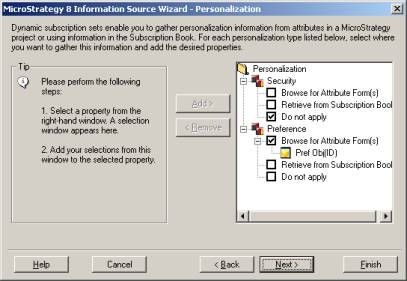
  • Create a dynamic Information Source as shown in the images below. This dynamic Information Source should access the Strategy Intelligence Server that will be used and map the user and subscription properties to the subscription report created in Developer step 6 above. The preference attribute form that will be used is the only form of the Pref Obj attribute created in Developer step 4.
ka04W000000Ohe0QAC_0EM440000002Bhk.jpeg
ka04W000000Ohe0QAC_0EM440000002BhI.jpeg
ka04W000000Ohe0QAC_0EM440000002BhT.jpeg
ka04W000000Ohe0QAC_0EM440000002Bhn.jpeg
  • Create a report execution content report that points to the content report created in Developer step 7 above as shown in the image below. Note: Since the content report is set to report execution there should not be any page-by attributes in the report.
ka04W000000Ohe0QAC_0EM440000002BhN.jpeg
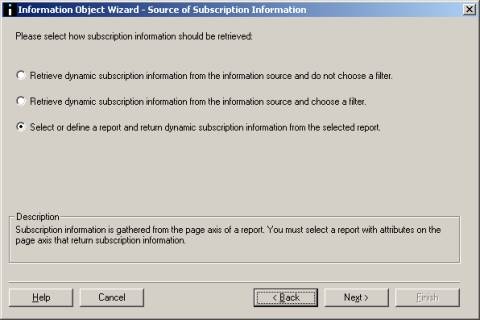
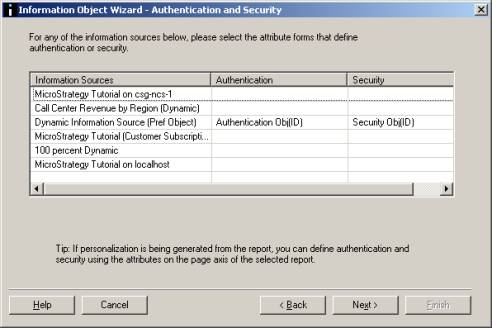
  • Create a subscription information object that will use the subscription report created in step 6 above and is configured in a similar way to the Information Source created in Narrowcast step 1 as shown in the images below:
ka04W000000Ohe0QAC_0EM440000002BhL.jpeg
ka04W000000Ohe0QAC_0EM440000002Bhm.jpeg
ka04W000000Ohe0QAC_0EM440000002BhR.jpeg
ka04W000000Ohe0QAC_0EM440000002Bhi.jpeg
ka04W000000Ohe0QAC_0EM440000002BhJ.jpeg
ka04W000000Ohe0QAC_0EM440000002BhU.jpeg
  • Create a service that is based on the content report created in Narrowcast step 2, and a dynamic subscription set that is based on the subscription information object created in Narrowcast step 3.
  • Execute the service.

Comment

0 comments

Details

Knowledge Article

Published:

May 4, 2017

Last Updated:

May 4, 2017