EducationSoftwareStrategy.com
StrategyCommunity

Knowledge Base

Product

Community

Knowledge Base

TopicsBrowse ArticlesDeveloper Zone

Product

Download SoftwareProduct DocumentationSecurity Hub

Education

Tutorial VideosSolution GalleryEducation courses

Community

GuidelinesGrandmastersEvents
x_social-icon_white.svglinkedin_social-icon_white.svg
Strategy logoCommunity

© Strategy Inc. All Rights Reserved.

LegalTerms of UsePrivacy Policy
  1. Home
  2. Topics

KB12169: Where are the XSL files located on the local MicroStrategy Narrowcast Server machine?


Community Admin

• Strategy


This article explains where the XSL files are located on the local MicroStrategy Narrowcast Server machine.

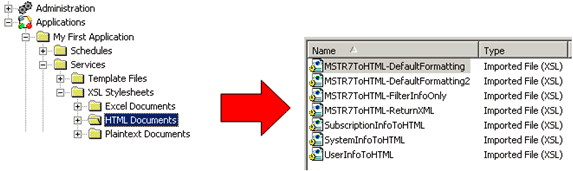
In order to format Information Source content, Strategy Narrowcast Server uses XSL (Extensible Stylesheet Language) files. During system creation, some default XSL files are created in the Repository. For example, the following image shows some of the HTML XSL files available:
ka04W000000OdpqQAC_0EM440000002Bgz.gif

 
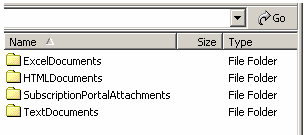
In order to make formatting changes, it may be necessary to create a customized XSL file. Using one of the default Strategy Narrowcast Server XSL files is a good starting point. These XSL files and more are found at the following location:
 
\Program Files\Strategy\Narrowcast Server\Delivery Engine\XSL
 

ka04W000000OdpqQAC_0EM440000002Bgy.gif


  • ExcelDocuments - holds the XSL files used to format data for the Excel Document Formatter.
  • HTMLDocuments - holds the XSL files used to format data for the HTML Document Formatter.
  • TextDocuments - holds the XSL files used to format data for the Plaintext Document Formatter.

Comment

0 comments

Details

Knowledge Article

Published:

June 15, 2017

Last Updated:

June 15, 2017