SYMPTOM:
A RunningSum metric ignores attributes specified in the break-by parameter that are in the Report objects window but not on the report template.
For example, consider the following scenario in the Strategy Tutorial project:
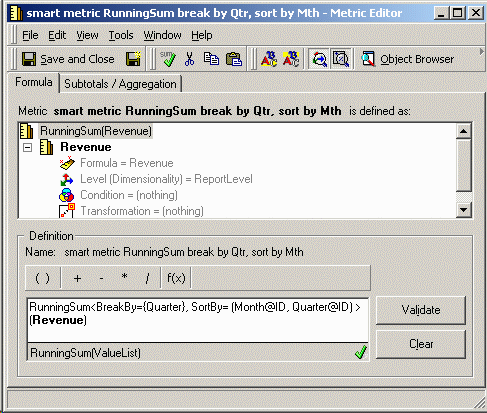
A user constructs a metric that is a RunningSum of the Revenue metric. This metric should calculate the RunningSum for monthly revenue while resetting every quarter. The RunningSum of Revenue metric settings are shown below:
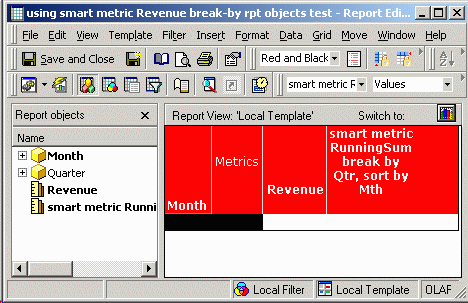
Subsequently, this metric is used in an OLAP Services report where the attribute Month is on the template and the attribute Quarter is only in the Report objects window, as demonstrated in the image below:
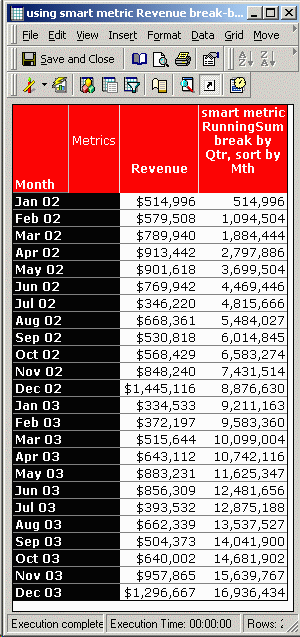
After running the report, notice in the image below how the RunningSum does not break by Quarter (i.e. reset calculations at the beginning of each quarter) as specified in the metric editor.
CAUSE:
If the RunningSum metric is configured to be a smart metric, break-by attributes that are not on the report template will be ignored.
Internally, OLAP Services reports have two templates: a base template that defines SQL generation, and a view template that defines report display, dynamic aggregation, view filtering, and other OLAP Services features.
When the RunningSum metric is a smart metric, the RunningSum calculation is done entirely in the view template, using the results retrieved with respect to the base template. The view template includes only those objects present on the template. Objects in the Report objects window are not part of the view template. As a result, when the RunningSum calculation is performed, the break-by attribute is not available to the analytical engine and the break in the calculation is not performed.
ACTION:
To resolve the issue, one of the following steps may be taken. It is not necessary to do both.
Below is the correct result of the same report, using a non-smart metric.
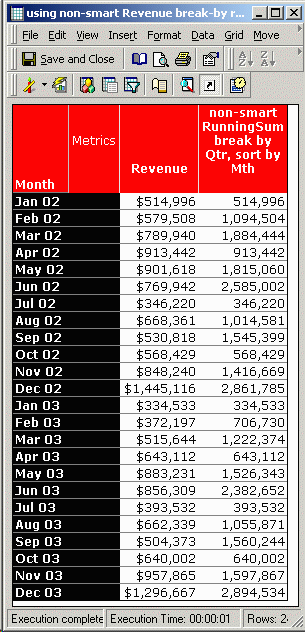
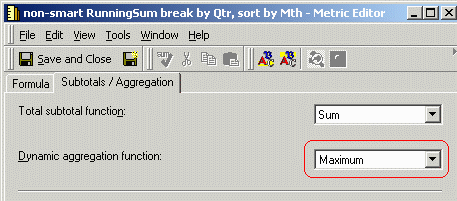
Note: Setting the metric as a non-smart metric will not return results unless the dynamic aggregation function is set. "Maximum" is the recommended setting and is illustrated below.
For details on setting the BreakBy and SortBy parameters, see the following Strategy technical note:
KB5700-007-0068 - How to set functional parameters such as 'Count on Fact', 'Breakby' and 'Sortby' in Strategy Desktop 8.x
For details on setting a metric to be smart or non-smart, see the following technical note:
KB4000-7X0-0299 - How to enable or disable 'Smart Totals' for compound metrics in Strategy Desktop
