EducationSoftwareStrategy.com
StrategyCommunity

Knowledge Base

Product

Community

Knowledge Base

TopicsBrowse ArticlesDeveloper Zone

Product

Download SoftwareProduct DocumentationSecurity Hub

Education

Tutorial VideosSolution GalleryEducation courses

Community

GuidelinesGrandmastersEvents
x_social-icon_white.svglinkedin_social-icon_white.svg
Strategy logoCommunity

© Strategy Inc. All Rights Reserved.

LegalTerms of UsePrivacy Policy
  1. Home
  2. Topics

KB12393: What is Logical Size Editor -- MicroStrategy Developer 9.x


Stefan Zepeda

Salesforce Solutions Architect • Strategy


What is Logical Size Editor -- MicroStrategy Developer 9.x

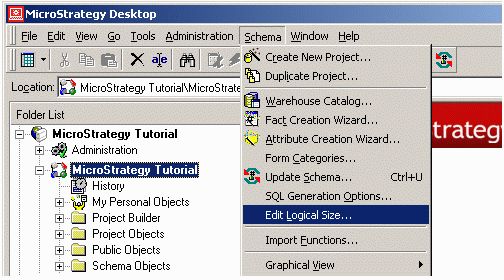
Logical Size Editor provides an interface to make the task of modifying logical table size much more centralized. This feature allows the user to view and modify all logical tables' sizes for a project and can be accessed by selecting Schema -> Edit Logical Size after logging into a project, as shown in the image below:
 

ka02R000000kcXXQAY_0EM440000002Fh2.gif

 
The following columns, shown in the image below, are displayed in the Logical Size Editor:
 

  • Size locked - Displays whether a table's size is locked (selected) or unlocked (cleared).
  • Table name - Displays the name of each table in the warehouse.
  • Size value - Displays the current size value for each table. For information on how Strategy calculates the table size, consult the following technical note:
    KB5200-7X0-0054 - How the Strategy 7.x, 8.x Engine selects the Optimal Tables to query Logical Table Size
     
  • Row count (optional) - This column is displayed if it is enabled from the Edit menu in the Logical Size Editor. This column displays the number of rows in each table.
ka02R000000kcXXQAY_0EM440000002Fh1.gif

The following options are available via the Logical Size Editor's main menus:
 

  1. File:
    • Save - Saves changes made to the tables.
    • Export - Exports the table status, name, size and if selected, row count information into CSV.
  2. Edit:
    • Lock All - Locks all table sizes.
    • Unlock All - Unlocks all table sizes.
    • Calculate all - Recalculates the logical table sizes for all unlocked tables.

Comment

0 comments

Details

Knowledge Article

Published:

April 14, 2017

Last Updated:

April 14, 2017