EducationSoftwareStrategy.com
StrategyCommunity

Knowledge Base

Product

Community

Knowledge Base

TopicsBrowse ArticlesDeveloper Zone

Product

Download SoftwareProduct DocumentationSecurity Hub

Education

Tutorial VideosSolution GalleryEducation courses

Community

GuidelinesGrandmastersEvents
x_social-icon_white.svglinkedin_social-icon_white.svg
Strategy logoCommunity

© Strategy Inc. All Rights Reserved.

LegalTerms of UsePrivacy Policy
  1. Home
  2. Topics

KB12409: Copy Repository Tool functionality in MicroStrategy Narrowcast Server 9.x - 10.x


Community Admin

• Strategy


The Copy Repository tool in MicroStrategy Narrowcast Server Administrator provides a simpler way of creating a copy of an existing MicroStrategy Narrowcast Server system.

The Copy Repository tool in Strategy Narrowcast Server Administrator provides a simpler way of creating a copy of an existing Strategy Narrowcast Server system. During the copy process, the following will be carried out for the Target system:

  1. New system name and GUID.
  2. Existing links to Distribution Manager, Execution Engine, and other machines are removed.
  3. Portal Repository is not copied.

To use the Copy Repository tool, follow the steps below:
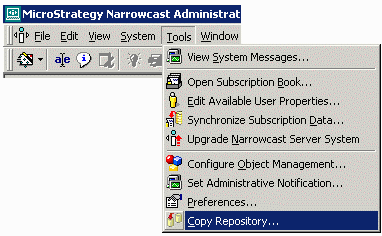
  • In Strategy Narrowcast Administrator, from the Tools menu select Copy Repository, as shown below:
ka0PW0000002xaHYAQ_0EM440000002Bgu.gif
  • When the Repository Copy window appears, the following options are presented:
ka0PW0000002xaHYAQ_0EM440000002Bgq.gif
    • Copy Object Repository: Copies the Object Repository from the source directory. Once this option is selected, the following options are also available:
      • Copy Subscription Book Repository used by the source: Also copies Subscription Book Repository used by the source along with the object repository.
      • Link the target Subscription Book Repository to the target Object Repository: Links the target Subscription Book Repository to the target Object Repository.
    • Copy Subscription Book Repository: Allows the user to copy only the Subscription Book Repository (users and addresses only) without maintaining a link with the original object repository.
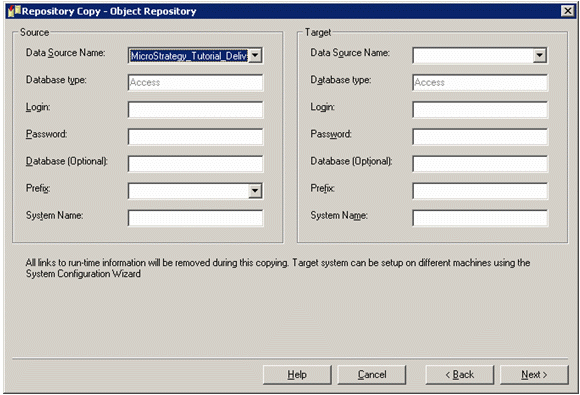
  • After clicking Next, the source and target information for the Object Repository (DSN, username, password, prefix, etc.) are gathered, as illustrated below:
ka0PW0000002xaHYAQ_0EM440000002Bgo.gif
  • Note the following when using the Repository Copy tool:
    • Target and Source systems cannot have the same names.
    • Target and Source prefix cannot have the same prefixes.
    • The target prefix must start with a character and has a maximum length of eight characters.
  • NOTE: During the copy process, all information concerning Distribution Manager and Execution Engines and other machines used by the source system will be removed from the target system.
  • After the information for the Object repository has been gathered, the information for the Subscription Book repository is collected, as shown in the image below:
ka0PW0000002xaHYAQ_0EM440000002Bge.gif
  • Users and addresses are copied by default. In addition, the following options are provided:
    • User preferences: Copies user preferences
    • Authentication and security: Copies authentication and security objects
    • Subscriptions: Copies the subscriptions (enabled only when User preferences and authentication object copying are enabled)
  • Finally, after specifying the Object Repository and Subscription Book Repository copy options, a summary window appears and the repository copy takes place.

Comment

0 comments

Details

Knowledge Article

Published:

April 4, 2017

Last Updated:

August 12, 2024