EducationSoftwareStrategy.com
StrategyCommunity

Knowledge Base

Product

Community

Knowledge Base

TopicsBrowse ArticlesDeveloper Zone

Product

Download SoftwareProduct DocumentationSecurity Hub

Education

Tutorial VideosSolution GalleryEducation courses

Community

GuidelinesGrandmastersEvents
x_social-icon_white.svglinkedin_social-icon_white.svg
Strategy logoCommunity

© Strategy Inc. All Rights Reserved.

LegalTerms of UsePrivacy Policy
  1. Home
  2. Topics

KB12444: How to create a list of reports with VLDB settings different from the default values in MicroStrategy Developer 9.x and higher


Stefan Zepeda

Salesforce Solutions Architect • Strategy


This technical note describes the steps to create a list of reports with VLDB settings different from the default values in MicroStrategy Developer 9.x and higher

To create a list of reports with VLDB settings different from the default values, follow the steps below:
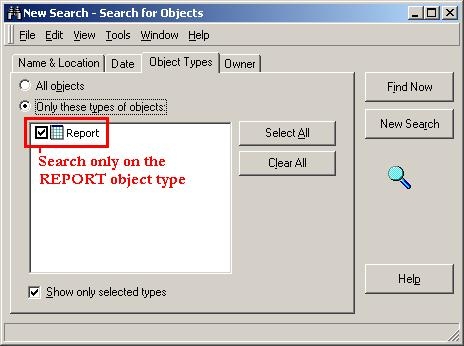
 

  • For any project, use the search functionality to return a list of all reports within that project, as shown below:
ka02R000000kY1UQAU_0EM440000002Fg3.jpeg
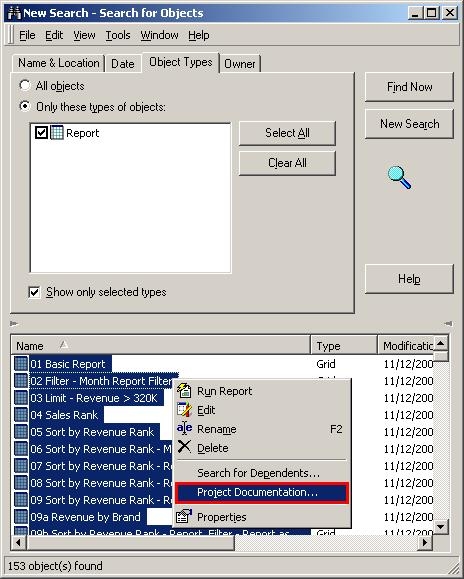
  • From the search results, select all reports (Ctrl + A) and right-click and select Project Documentation, as shown below:
ka02R000000kY1UQAU_0EM440000002Fg1.jpeg
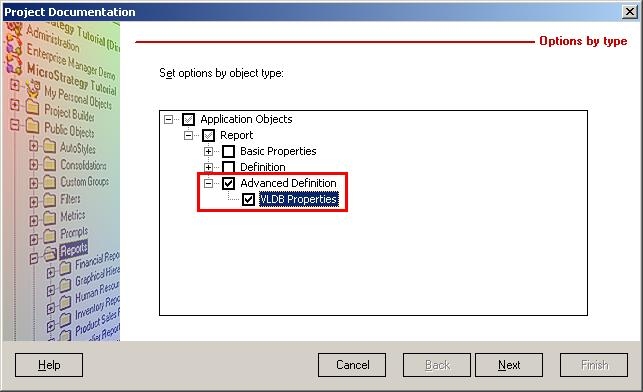
  • In the Project Documentation Editor, check the VLDB Properties check-box (under the Advanced Definition check-box), as shown below:
ka02R000000kY1UQAU_0EM440000002Fg5.jpeg
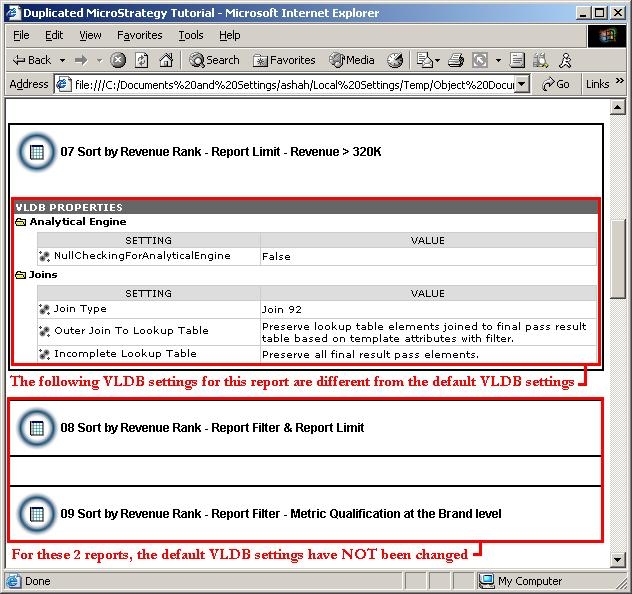
  • Change the settings as desired in the Project Documentation Editor and then click Next > Finish > Close. The resulting Project Documentation report will show all reports and if their VLDB properties have been changed, as shown below. This is one way in which to determine if a report has been modified inadvertently, which might result in returning an improper result set.
ka02R000000kY1UQAU_0EM440000002Fg2.jpeg

NOTE: In the generated Project Documentation report, by default, only 25 reports per page will be shown unless the Object per page setting is changed.


Comment

0 comments

Details

Knowledge Article

Published:

June 12, 2017

Last Updated:

June 12, 2017