SYMPTOM:
Project designers encounter SQL such as the following when using a logical or physical view to produce an outer join between unrelated attributes on the same report:
select distinct a11. AS REGION_ID,
a11. AS REGION_NAME,
a11. AS SUBCAT_ID,
a11. AS SUBCAT_DESC
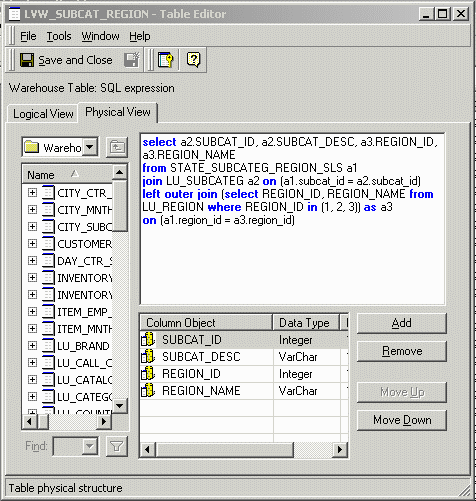
from (select a2.SUBCAT_ID, a2.SUBCAT_DESC, a3.REGION_ID, a3.REGION_NAME
from STATE_SUBCATEG_REGION_SLS a1
join LU_SUBCATEG a2 on (a1.subcat_id = a2.subcat_id)
left outer join (select REGION_ID, REGION_NAME from LU_REGION where REGION_ID in (1, 2, 3)) as a3
on (a1.region_id = a3.region_id)) a11,
a12
where a11. = a12.
Note that all the columns selected come from the logical view (a11), but the From clause still retains a join to LU_SUBCATEG (a12). This join is the only reference to LU_SUBCATEG.
For more details on the technique to create an outer join between attributes, consult the following Strategy Knowledge Base document:
KB10818 - How to use Logical Views to specify an outer join between two attribute lookup tables when only attributes are on a report
NOTE: The aforementioned document and the example in this document use the logical view feature introduced in Strategy 8.0.0 to create the outer join.
The foregoing SQL was produced with the following object definitions in the Strategy Tutorial project.
A logical view is created, establishing an outer join between the Subcategory attribute and certain elements of the Region attribute, as shown below:
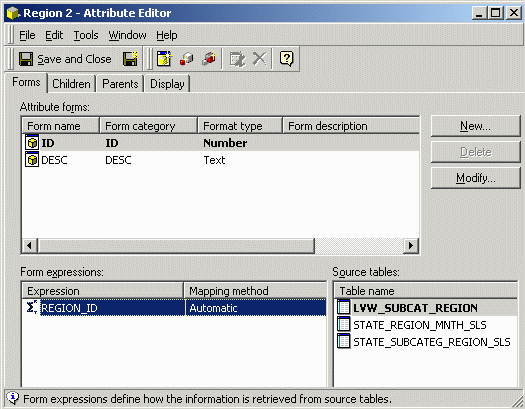
There is also defined a secondary Region attribute that exists with reference only to this logical view and to the appropriate fact tables, as shown below:
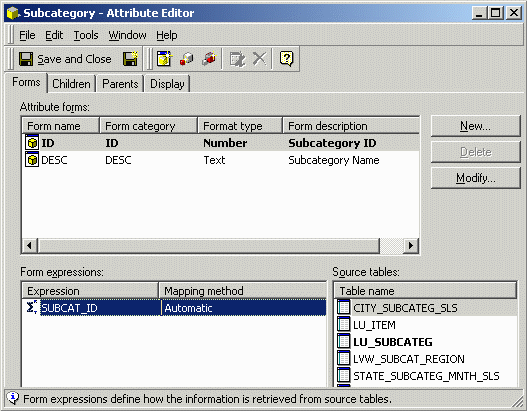
The subcategory attribute, however, is defined in terms of its normal lookup table, with the logical view as a secondary lookup table, as shown below:
CAUSE:
The SQL is generated in this way because there is no explicit parent-child relationship between the attributes defined in the logical view. As such, the scenario represents a misapplication of KB5200-800-0480, which is intended only for attributes with existing parent-child relationships.
When attributes have no parent-child relationship, they are considered to be indirectly related through their coexistence in fact tables. If the attributes are used in a query without any metrics — that is, a query that references no fact tables — the theoretically correct relationship between the attributes is a cross join, pairing up each element of one attribute with every element of the other attribute.
In this case, project architects might want to use the logical view as a relationship table, establishing a many-to-many relationship between the attributes. If this is the desired outcome, the relationship needs to be modeled as a true many-to-many relationship with the logical view defined as the relationship table.
By defining a relationship in the logical view, but not defining the relationship in the attributes themselves, the attribute definitions are not logically consistent. The attributes have valid definitions when considered individually (and they can be saved in the metadata as such), but they are not consistent in terms of the project schema as a whole.
ACTION:
To resolve the problem, project architects must decide whether the attributes should be related or unrelated.
NOTE: in this last case, it is sufficient to define the alternate attribute so that its lookup table is the logical view itself.
KB12446
