EducationSoftwareStrategy.com
StrategyCommunity

Knowledge Base

Product

Community

Knowledge Base

TopicsBrowse ArticlesDeveloper Zone

Product

Download SoftwareProduct DocumentationSecurity Hub

Education

Tutorial VideosSolution GalleryEducation courses

Community

GuidelinesGrandmastersEvents
x_social-icon_white.svglinkedin_social-icon_white.svg
Strategy logoCommunity

© Strategy Inc. All Rights Reserved.

LegalTerms of UsePrivacy Policy
  1. Home
  2. Topics

KB12450: How to create an attribute that masks data elements in MicroStrategy Developer (formerly Desktop)


Stefan Zepeda

Salesforce Solutions Architect • Strategy


Article outlines how to create an attribute that masks data elements in MicroStrategy Developer

In certain circumstances, administrators may want to mask the data that users are able to see when executing reports. Follow the steps below to mask data elements in Strategy Developer (the Strategy Tutorial project is used in this example):
 

  • Select the attribute to be masked. 'Customer Birthdate' is used in this example.
  • Create a new attribute that maps to the same column as the original attribute.
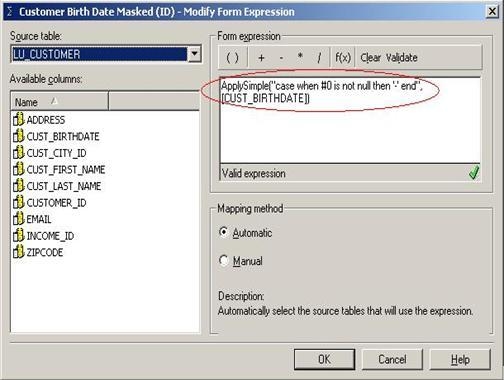
  • Use an ApplySimple statement that masks the data contained in the columns when the data is 'not null' as shown below:
ka02R000000kY95QAE_0EM440000002FcY.jpeg
  • Validate the expression before saving and closing.
  • Save and close the attribute, naming it accordingly. For this example, the attribute was named 'Customer Birth Date Masked'.
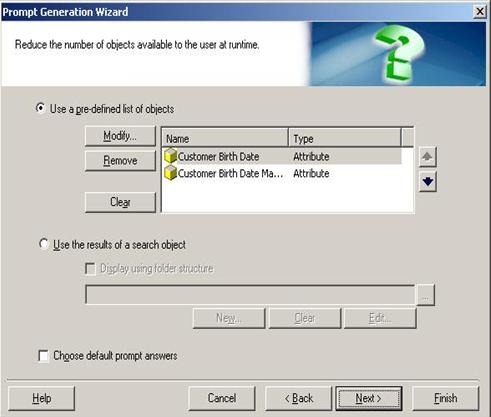
  • Create an object prompt that prompts the user on the unmasked and the masked attributes, as shown below:
ka02R000000kY95QAE_0EM440000002FcW.jpeg
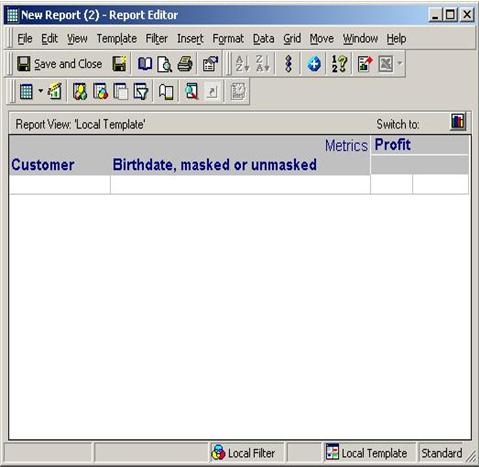
  • Create a report that contains the desired information, including the object prompt in the template as if it were an attribute, as shown below:
ka02R000000kY95QAE_0EM440000002FcH.jpeg
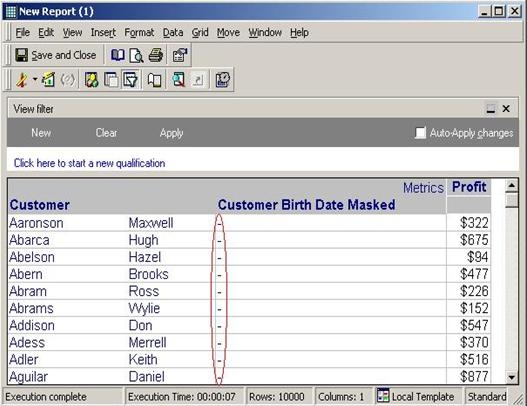
  • Execute the report, choosing the masked version of the attribute. Notice that the values for the attribute display only as '-' as shown below:
ka02R000000kY95QAE_0EM440000002FcJ.jpeg

NOTE: This example was performed pointing to a metadata and warehouse housed in SQL Server. The syntax will vary depending on the environment.
 
Mapping two attributes to the same column may present some issues if both attributes are present on the same report. In this situation, it is recommended that aliases be used to avoid attribute-role conflicts. 


Comment

0 comments

Details

Knowledge Article

Published:

June 10, 2017

Last Updated:

June 10, 2017