EducationSoftwareStrategy.com
StrategyCommunity

Knowledge Base

Product

Community

Knowledge Base

TopicsBrowse ArticlesDeveloper Zone

Product

Download SoftwareProduct DocumentationSecurity Hub

Education

Tutorial VideosSolution GalleryEducation courses

Community

GuidelinesGrandmastersEvents
x_social-icon_white.svglinkedin_social-icon_white.svg
Strategy logoCommunity

© Strategy Inc. All Rights Reserved.

LegalTerms of UsePrivacy Policy
  1. Home
  2. Topics

KB12463: Metric object prompt cannot be dragged onto a set qualification in a report filter in MicroStrategy Developer 10.x


Stefan Zepeda

Salesforce Solutions Architect • Strategy


This Technical Note describe an issue that occur where metric object prompt cannot be dragged onto a set qualification in a report filter in MicroStrategy Developer 10.x

SYMPTOM:
The report filter editor does not allow a user to drag an existing metric object prompt into the metric field of a set qualification in the report filter in Strategy Developer 10.x.
 
CAUSE:
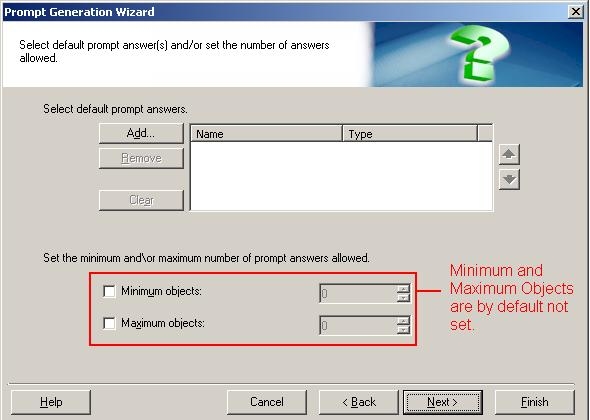
This issue is due to the fact that the existing object prompt does not have any minimum or maximum objects set, as shown below:
ka02R000000kb7LQAQ_0EM440000002Ff5.jpeg

 
ACTION:
Follow the steps below to resolve this issue:

  • In the object prompt, check both boxes for Minimum and Maximum objects and set their values to 1, as shown below:
ka02R000000kb7LQAQ_0EM440000002Ff6.jpeg
  • Advance through the Wizard or click finish to save the prompt.
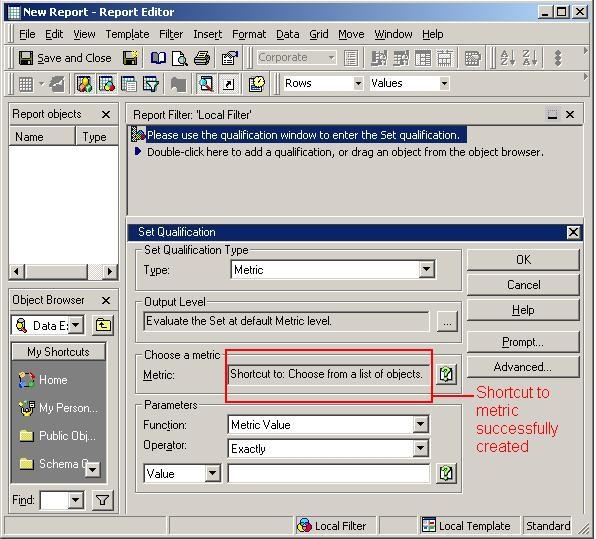
  • Open the report and drag the prompt into the metric field. The field should now display 'Shortcut to: Object_Prompt_Name' as shown below:
ka02R000000kb7LQAQ_0EM440000002Ff8.jpeg

12463


Comment

0 comments

Details

Knowledge Article

Published:

April 17, 2017

Last Updated:

May 28, 2018