SYMPTOM:
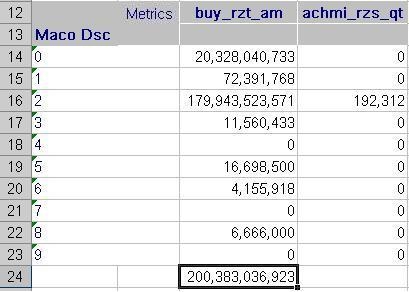
When exporting Big Decimal datatypes to Microsoft Excel, the data type is converted to a Text data type rather than a Number in Strategy. The following image shows what appears when a Big Decimal Type (buy_rzt_am) and a Numeric Type (achmi_rzs_qt) are exported to Excel:

Notice that (buy_rzt_am) numbers are formatted as Text. Since the numbers are converted to Text, calculations cannot be performed on them.
CAUSE:
Big Decimals are not supported by Microsoft Excel. This is a known limitation of the Big Decimal datatype and the Excel program.
WORKAROUND:
Users can perform one of the following suggested workarounds:
The following image shows what appears when highlighting a Big Decimal cell in the Excel file in Excel.

Note the exclamation mark appears in the cell notifying users that there may be inconsistencies in the data.
Click on the exclamation icon for a drop-down menu and choose the option 'Convert to Number' as shown below:

Once the data is converted, calculations can then be performed using this data, as shown below:
Keep in mind that Excels lack of support for big decimal means precision may be lost on the number upon conversion.
