EducationSoftwareStrategy.com
StrategyCommunity

Knowledge Base

Product

Community

Knowledge Base

TopicsBrowse ArticlesDeveloper Zone

Product

Download SoftwareProduct DocumentationSecurity Hub

Education

Tutorial VideosSolution GalleryEducation courses

Community

GuidelinesGrandmastersEvents
x_social-icon_white.svglinkedin_social-icon_white.svg
Strategy logoCommunity

© Strategy Inc. All Rights Reserved.

LegalTerms of UsePrivacy Policy
  1. Home
  2. Topics

KB12496: How to create a metric to calculate on a column of a fact table based on another column's condition in MicroStrategy Developer


Stefan Zepeda

Salesforce Solutions Architect • Strategy


Consider the following scenario:
 
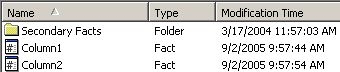
There are two facts created from the same fact table, labeled Column1 and Column2 in Strategy Developer, as shown below:
 

ka02R000000kbxNQAQ_0EM440000002Ffw.jpeg

 
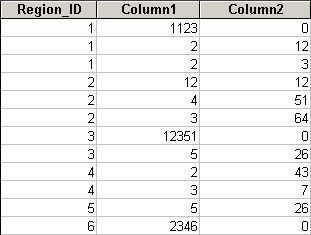
Below is the fact table in the database:
 

ka02R000000kbxNQAQ_0EM440000002Ffz.jpeg

 
Business Requirement:
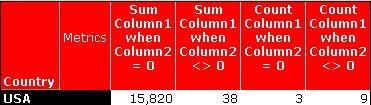
A metric needs to sum or count Column1 when Column2 is equal to 0 or NOT equal to 0.
 
In the Metric Editor, the following syntax can be used for the metric definition:
 

  • Sum Metric
    • Metric definition to calculate Sum when Column2 is equal to 0:
      Sum(ApplySimple("Case when #0 = 0 then #1 else 0 end", Column2, Column1)) {~ }
    • Metric definition to calculate Sum when Column2 is NOT equal to 0:
      Sum(ApplySimple("Case when #0 <> 0 then #1 else 0 end", Column2, Column1)) {~ }
  • Count Metric
    • Metric definition to calculate Count when Column2 is equal to 0:
      Count(ApplySimple("Case when #0 = 0 then #1 else Null end", Column2, Column1)) {~ }
    • Metric definition to calculate Count when Column2 is NOT equal to 0:
      Count(ApplySimple("Case when #0 <> 0 then #1 else Null end", Column2, Column1)) {~ }

Note: Notice that the ELSE statement is using 0 or Null based on the metric functions, such as Sum or Count. For the example above, the Count metric should use Null for the ELSE statement so not to count anything when #0 meets the condition.
 
The following is an example of a report result with the business requirements listed above:
 

ka02R000000kbxNQAQ_0EM440000002Ffu.jpeg

 
This issue is applicable to all currently supported versions of Strategy Desktop.


Comment

0 comments

Details

Knowledge Article

Published:

June 5, 2017

Last Updated:

June 5, 2017