SYMPTOM:
The Execution Time shown on the Strategy taskbar after a report is executed may be different than the time span between the Execution Start Time and the Execution Stop Time. These execution times are found in the SQL View of the report, as shown below:
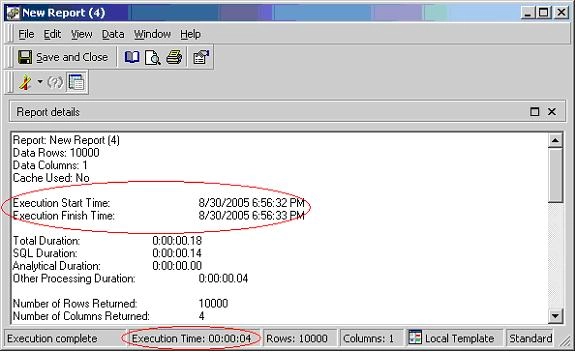
Although the time elapsed between the Execution Start time and the Execution Stop time is only 1 second, the Execution time is 4 seconds.
CAUSE:
This is due to the different processes that the two measurements calculate. The following processes occur upon report execution: resolution of the report (finding out what is on the report), the SQL Engine process (generating the SQL), the Query Engine process (executing the SQL against the warehouse), and the Analytical Process (executing any functions against the returned values). The Execution Start and Stop Time measurements listed in the SQL apply only to the Query Engine. The Execution Time listed in the taskbar applies to all four different Processing Units.
This issue is applicable to all currently supported versions of Strategy Developer.
