EducationSoftwareStrategy.com
StrategyCommunity

Knowledge Base

Product

Community

Knowledge Base

TopicsBrowse ArticlesDeveloper Zone

Product

Download SoftwareProduct DocumentationSecurity Hub

Education

Tutorial VideosSolution GalleryEducation courses

Community

GuidelinesGrandmastersEvents
x_social-icon_white.svglinkedin_social-icon_white.svg
Strategy logoCommunity

© Strategy Inc. All Rights Reserved.

LegalTerms of UsePrivacy Policy
  1. Home
  2. Topics

KB12508: What are the operations performed by the Update Schema process in MicroStrategy Intelligence Server and Developer 9.4.x - 10.x?


Stefan Zepeda

Salesforce Solutions Architect • Strategy


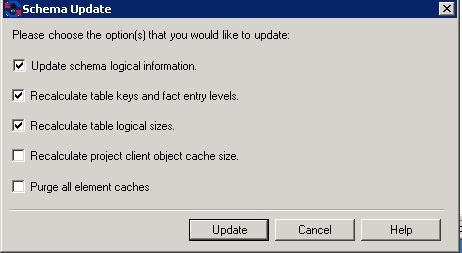
The update schema command in Strategy Developer 10.x presents the following five options:
ka04W000001IqQaQAK_0EM440000002MmM.jpeg

 
These options fall into the categories of metadata maintenance (options 2 -4), SQL Generation Engine schema loading (the first option) and purging the element caches.
 
In general terms, these options perform the following tasks. The tasks are listed from bottom to top since the 'Update schema logical information' process is always executed last.
1. Purge all element caches
This operation clears up all attribute element caches saved on the Strategy Intelligence Server machine. 
 
2. Recalculate project client object cache size:
Schema loading performance may degrade if the object cache is too small for the project. This option computes the optimal object cache size for this project's schema and sets the appropriate project configuration value.
For more details, consult the following Strategy Knowledge Base technical note:
KB13390: How to improve the project loading speed in Strategy Intelligence Server 9.x.
Steps one through three analyze schema object definitions and update object properties in the metadata. Step four makes no changes in the metadata; it reads the object definitions and converts them to the internal object structure required for SQL generation.
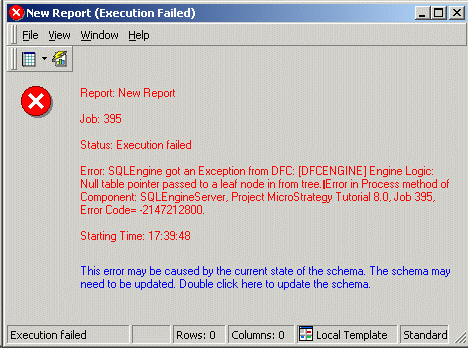
Many 'DFCEngine Exceptions', shown below, are caused by discrepancies between the Strategy SQL Generation Engine's internal representation and the definitions of the schema objects in the metadata.
 

ka04W000001IqQaQAK_0EM440000002BYw.gif


Error: SQLEngine got an Exception from DFC: Engine Logic: Null table pointer passed to a leaf node in from the tree. Error in Process method of Component: SQLEngineServer, Project Strategy Tutorial 8.0, Job 395, Error Code= -2147212800.

 
This error may be caused by the current state of the schema. The schema may need to be updated. Double click here to update the schema.
In such instances, the schema must be updated within the executable that is actually performing the SQL generation. In two-tier connections, this is Strategy Desktop; for three-tier connections, the schema update takes place on the Strategy Intelligence Server (although it must be triggered within Strategy Desktop).
A two-tier schema update, then, is not a substitute for a three-tier schema update. Reloading the schema into an instance of the Strategy SQL Generation Engine running on the Strategy Desktop machine will not affect the behavior of the Strategy SQL Generation Engine in the Intelligence Server.
Because the Strategy SQL Generation Engine is sensitive to differences between its internal state and the states of metadata objects, there is a risk of SQL generation failures if schema modifications take place during normal user activity. In general, it is not recommended to perform schema updates during periods of normal or high usage. Schema changes should normally be reserved for periods of little to no user activity.
 
3. Recalculate table logical sizes: For every table in the project whose logical size is allowed to change automatically, this process updates the logical size according to the procedure described in the following Strategy Knowledge Base technical note:
KB5300: How MicroStrategy SQL Generation Engine calculates the Logical Table Size to choose the optimal fact tables for SQL queries 
 
4. Recalculate table keys and fact entry levels: If some of the relationships between attributes are changed, it may require table keys in fact entry levels to be reevaluated. Table keys are the lowest level attributes in their respective hierarchies that are present in the logical table. Fact entry levels are the lowest attribute levels at which a fact exists. The fact entry levels correspond to the lowest-level table key attributes for all the tables that define the fact. For example, the RGN_MTH_SUBCAT_SLS table may also include Quarter and Category, but its key attributes will be Region, Month and Subcategory. A fact defined on this table would have Region, Month and Subcategory. But, if the fact also exists in a table containing the Item attribute, then its entry-level would be Region, Month and Item.
Changes in attribute relationships may affect which attributes are at the lowest level in their hierarchies on certain tables. This has an impact on fact entry levels and controls table join behavior in the Strategy SQL Generation Engine.
 
5. Update schema logical information: The Strategy SQL Generation Engine uses an internal representation of the project's schema, which is held in Strategy Intelligence Server memory (or Strategy Developer memory, in two-tier connections). This process reloads the internal representation so that it matches the definitions of schema objects in the metadata.
 

KB12508


Comment

0 comments

Details

Knowledge Article

Published:

May 25, 2017

Last Updated:

December 11, 2018