EducationSoftwareStrategy.com
StrategyCommunity

Knowledge Base

Product

Community

Knowledge Base

TopicsBrowse ArticlesDeveloper Zone

Product

Download SoftwareProduct DocumentationSecurity Hub

Education

Tutorial VideosSolution GalleryEducation courses

Community

GuidelinesGrandmastersEvents
x_social-icon_white.svglinkedin_social-icon_white.svg
Strategy logoCommunity

© Strategy Inc. All Rights Reserved.

LegalTerms of UsePrivacy Policy
  1. Home
  2. Topics

KB12537: How to open drill results in a new window in MicroStrategy Web 9.x and above


Community Admin

• Strategy


This technical note introduces the "Open drill results in a new window option" located in Web Preferences for MicroStrategy Web 9.x and 10.x. This improves the

SUMMARY:
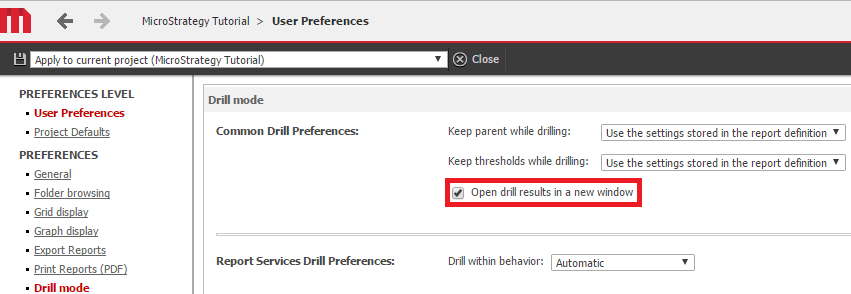
In Strategy Web 9.x and 10.x, in Web Preferences -> Project Defaults -> Drill Mode, there is an option to `Open drill results in a new window`. If this option is selected both at the Project Defaults and User Preferences levels, a new window opens when drilling. This option is illustrated below:
ka04W000000OhWqQAK_0EM440000002LvX.png

This setting makes it easy to go back to the parent report, as it is in a separate browser window.


Comment

0 comments

Details

Knowledge Article

Published:

May 16, 2017

Last Updated:

May 16, 2017