EducationSoftwareStrategy.com
StrategyCommunity

Knowledge Base

Product

Community

Knowledge Base

TopicsBrowse ArticlesDeveloper Zone

Product

Download SoftwareProduct DocumentationSecurity Hub

Education

Tutorial VideosSolution GalleryEducation courses

Community

GuidelinesGrandmastersEvents
x_social-icon_white.svglinkedin_social-icon_white.svg
Strategy logoCommunity

© Strategy Inc. All Rights Reserved.

LegalTerms of UsePrivacy Policy
  1. Home
  2. Topics

KB12554: Deletion of Incomplete Projects in Microstrategy Developer


Stefan Zepeda

Salesforce Solutions Architect • Strategy


This technical note explains how to delete an incomplete project

What is an Incomplete Project?
If project duplication fails during the duplication process due to an external error (network connection failure, database connection failure, hardware failure, etc.) the target project will be incomplete. Some of the project objects were copied over to the target project, but the project is not completely copied and is not functional.
 
An incomplete project will still be visible in the project source, but when a user attempts to open the project, the following error will occur:

 

ka0PW00000019E9YAI_0EM440000002Ff9.jpeg


You cannot access project 'xxx' because it is incomplete. This can be a result of failure experienced during the project creation, duplication, or upgrade process.
 

What action should be taken?
The incomplete project cannot be repaired, therefore it must be deleted. After deleting the incomplete project, the duplication process can be started again, creating a new copy of the source project.
 
How can the incomplete project be deleted?
Method 1 - Via Strategy Developer:
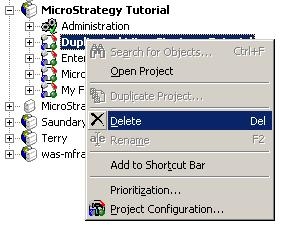
To delete the incomplete project through Strategy Developer, right-click on the project and select Delete, as shown in the following image:
 

ka0PW00000019E9YAI_0EM440000002Ff7.jpeg


Method 2 - Via Strategy Command Manager:
A command in Strategy Command Manager allows for the deletion of projects from the Command Manager interface. Using this option may provide a solution for customers unable to use the first method. Execute the following command in Strategy Command Manager or newer interface:
 
DELETE PROJECT "< project name >";
Example:
 
DELETE PROJECT "Duplicated Strategy Tutorial";
Note: Contact Strategy Technical Support for assistance if neither of the above methods succeeds in deleting the incomplete project.


Comment

0 comments

Details

Knowledge Article

Published:

June 2, 2017

Last Updated:

March 7, 2024