EducationSoftwareStrategy.com
StrategyCommunity

Knowledge Base

Product

Community

Knowledge Base

TopicsBrowse ArticlesDeveloper Zone

Product

Download SoftwareProduct DocumentationSecurity Hub

Education

Tutorial VideosSolution GalleryEducation courses

Community

GuidelinesGrandmastersEvents
x_social-icon_white.svglinkedin_social-icon_white.svg
Strategy logoCommunity

© Strategy Inc. All Rights Reserved.

LegalTerms of UsePrivacy Policy
  1. Home
  2. Topics

KB12595: Export Options window does not appear when exporting reports from MicroStrategy Web 9.4.1 and above.


Community Admin

• Strategy


Export Options window does not appear when exporting reports from MicroStrategy Web 9.4.1 and above.

SYMPTOM:
The Export Options window does not appear when a user exports a report from Strategy Web 9.4.1 and above.
 
STEPS TO REPRODUCE:

  1. The user exports a report from Strategy Web.
  2. The Export Options window does not appear for the user to select the options to export.
  3. This is a user-specific issue. The user experiences the issue from any machine.

CAUSE:
There are two possible causes for this issue:
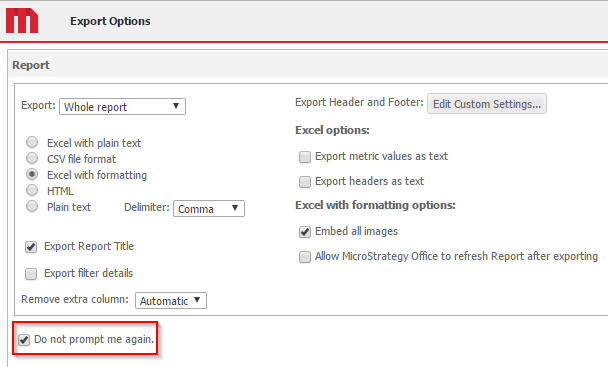
  • The user has enabled or checked the option 'Do not prompt me again' in the Export Options window when it opened on a previous occasion, as shown below:
ka04W000000OfF6QAK_0EM440000002L9E.png
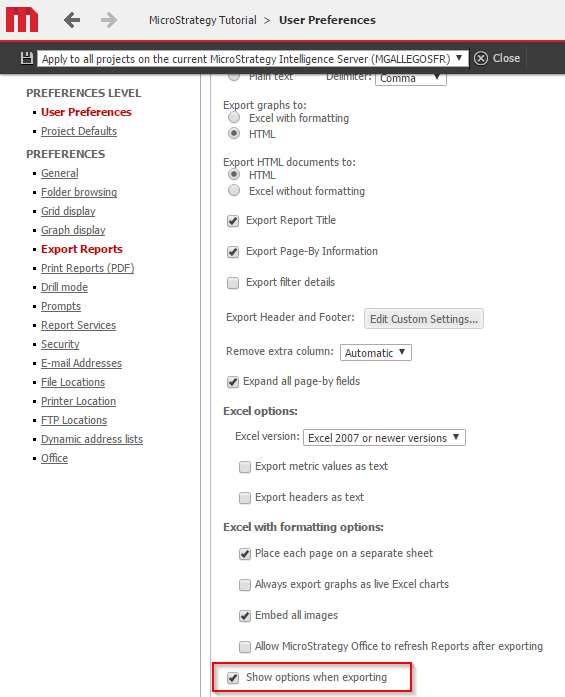
  • The option 'Show options for exporting' under Export preference at the User Preferences level is disabled, as shown below:
ka04W000000OfF6QAK_0EM440000002L9J.png

ACTION:
To resolve the issue, enable the option 'Show options for exporting' following the next steps:

  1. Log into a project in Strategy Web.
  2. Click on Preferences from the Tools Menu or a folder within the project.
  3. Select the Export under Preferences.
  4. Scroll down on the Export Preference page and enable the option 'Show options for exporting'.
  5. Click on Apply to make sure the modification is applied on all projects or selected project from the drop-down box next to the Apply button.

Comment

0 comments

Details

Knowledge Article

Published:

May 5, 2017

Last Updated:

May 5, 2017