EducationSoftwareStrategy.com
StrategyCommunity

Knowledge Base

Product

Community

Knowledge Base

TopicsBrowse ArticlesDeveloper Zone

Product

Download SoftwareProduct DocumentationSecurity Hub

Education

Tutorial VideosSolution GalleryEducation courses

Community

GuidelinesGrandmastersEvents
x_social-icon_white.svglinkedin_social-icon_white.svg
Strategy logoCommunity

© Strategy Inc. All Rights Reserved.

LegalTerms of UsePrivacy Policy
  1. Home
  2. Topics

KB12622: Graph title is displayed twice when a report in graph view is exported to PDF in MicroStrategy Developer


Stefan Zepeda

Salesforce Solutions Architect • Strategy


When a report in graph view is exported to PDF in MicroStrategy Developer, the graph title is displayed twice.

SYMPTOM:
When a report in graph view is exported to PDF in Strategy Developer, the graph title is displayed twice, as shown below:
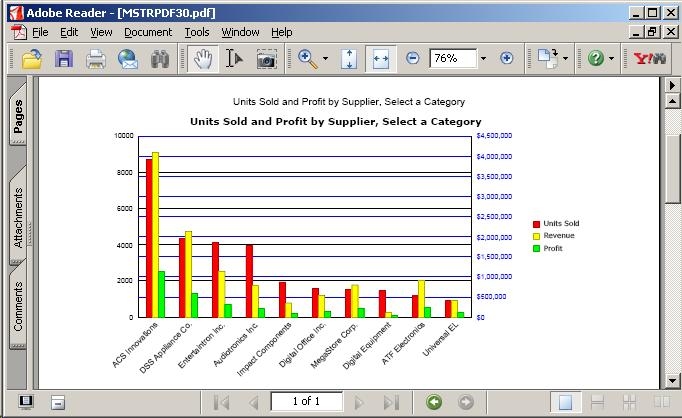
 

ka02R000000kY1GQAU_0EM440000002FeY.jpeg

 
CAUSE:
This issue occurs because by default, exporting to PDF will include the report name in the PDF as well as the graph's title that is displayed in graph mode.
 
ACTION:
To display the graph title only once, follow one of the two options below:
 
Option 1:  Remove the report name from the PDF Export Options settings
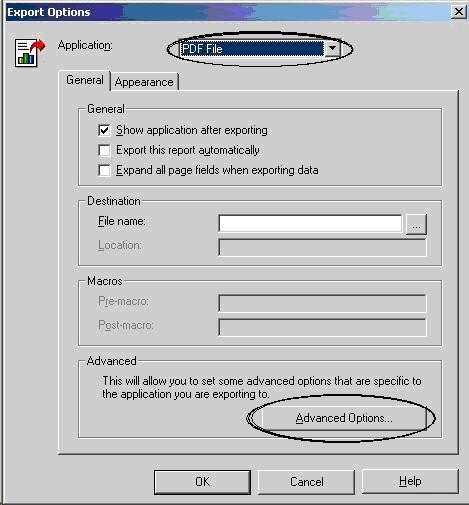
  • Execute the report in graph view. Go to the Data menu and select 'Export Options.'
  • From the Application drop-down menu, select PDF File. Click on Advanced Options, as shown below:
ka02R000000kY1GQAU_0EM440000002Fep.jpeg
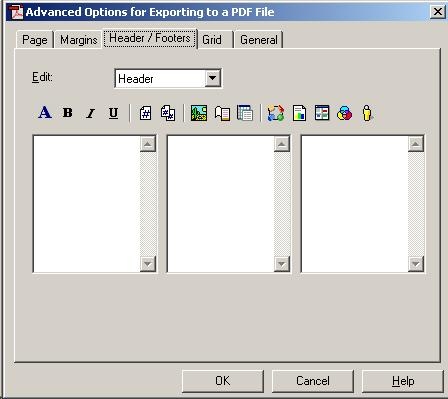
  • Select the Headers/Footers tab. Select Header from the Edit pull-down menu, if not already selected, and make sure the three edit windows are empty, as shown below:
ka02R000000kY1GQAU_0EM440000002Feo.jpeg
  • Click on OK. Click on OK again to close the Export Options window.
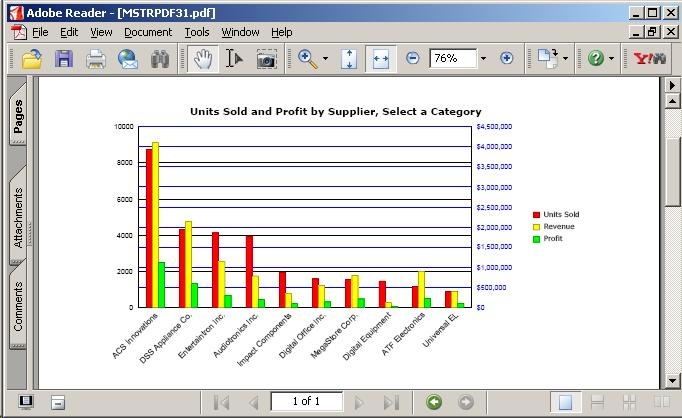
  • Export the graph to PDF and view the PDF Document. The graph title will be displayed only once, as shown below:
ka02R000000kY1GQAU_0EM440000002FeW.jpeg

Option 2: Remove the report name from the report in graph mode
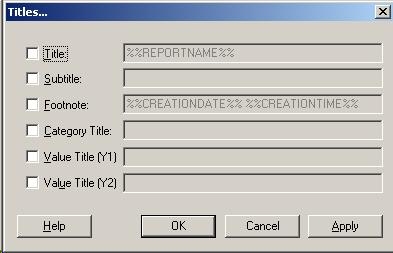
  • Go to the Graph menu and select Titles and Labels.
  • Uncheck the Title box, as shown below:
ka02R000000kY1GQAU_0EM440000002Fey.jpeg
  • Click on OK.
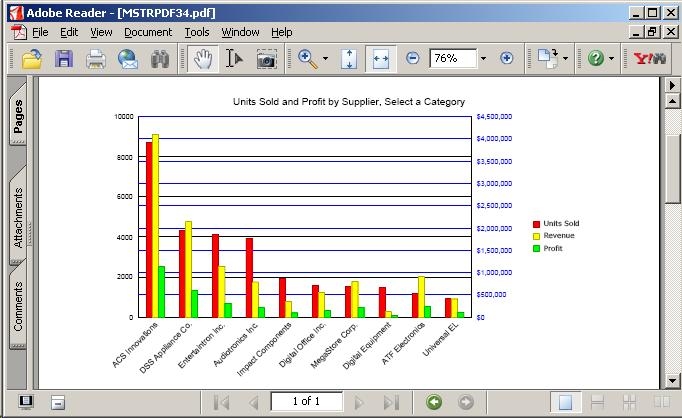
  • Export the graph to PDF and view the PDF Document. The graph's title will be displayed only once, as shown below:
ka02R000000kY1GQAU_0EM440000002Fer.jpeg

Comment

0 comments

Details

Knowledge Article

Published:

June 12, 2017

Last Updated:

June 12, 2017