EducationSoftwareStrategy.com
StrategyCommunity

Knowledge Base

Product

Community

Knowledge Base

TopicsBrowse ArticlesDeveloper Zone

Product

Download SoftwareProduct DocumentationSecurity Hub

Education

Tutorial VideosSolution GalleryEducation courses

Community

GuidelinesGrandmastersEvents
x_social-icon_white.svglinkedin_social-icon_white.svg
Strategy logoCommunity

© Strategy Inc. All Rights Reserved.

LegalTerms of UsePrivacy Policy
  1. Home
  2. Topics

KB12639: How to search for all facts including those with extensions and/or degradations in MicroStrategy Developer


Stefan Zepeda

Salesforce Solutions Architect • Strategy


This article describes users can search for all facts including those with extensions and/or degradations in MicroStrategy Developer

SYMPTOM:
It is currently not possible to search for all facts with extensions and/or degradations using the Search Editor in Strategy Developer.
 
However, an enhancement request has been logged in order to provide users with the ability to search for only those facts with extensions and/or degradations via the Search Editor.
 
ACTION:
This issue was reviewed by our Technology team for feasibility and will not be scoped for a code fix in any upcoming Strategy release.
 
WORKAROUND:
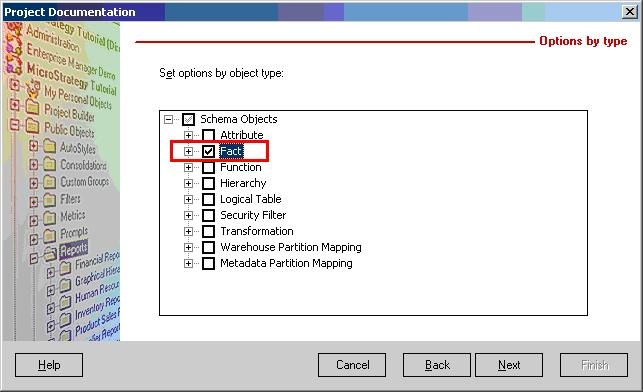
To workaround this limitation, use the Project Documentation Wizard to generate a report on the Fact (Schema) Object Type, as shown below:
ka02R000000kVk9QAE_0EM440000002Feh.jpeg

 
This will generate report documentation on all the facts (including extensions and/or degradations) for a selected project, as shown below:

ka02R000000kVk9QAE_0EM440000002Feb.jpeg

Comment

0 comments

Details

Knowledge Article

Published:

May 25, 2017

Last Updated:

May 25, 2017