SYMPTOM:
When a user types in keywords to tries to find element names in an element prompt, the search returns all objects containing the keywords in Strategy Developer 9.4.x-10.x. However, the user would like to search for the exact phrase.
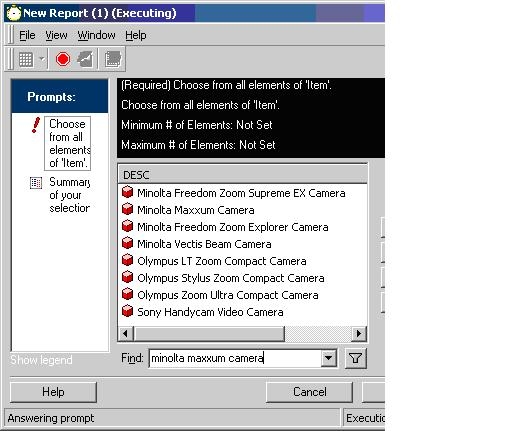
Using the Strategy Tutorial Project as an example, a user wishes to search for an item named Minolta Maxxum Camera. The search results for Minolta Maxxum Camera return all items containing any or all of those words, as shown below:
CAUSE:
This occurs due to the search defaulting to 'ORing' the search terms. This means that any or all keywords that match the strings will be returned. The SQL for this search is shown below:
SELECT ITEM_NAME FROM LU_ITEM
WHERE (ITEM_NAME LIKE '%Minolta%' OR ITEM_NAME LIKE '%Maxxum%' OR ITEM_NAME LIKE '%Camera%')
ACTION:
To match an exact string, use double quotations around the search terms. The search results for "Minolta Maxxum Camera" are shown below:
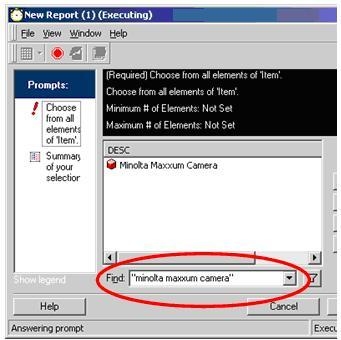
Below is the SQL for the "Minolta Maxxum Camera" with double quotes:
SELECT ITEM_NAME FROM LU_ITEM
WHERE ITEM_NAME LIKE 'Minolta Maxxum Camera'
Note that the double quotes must include exactly what the user is searching for. Using double quotations around only part of the search terms, for example "Maxxum", will not return the desired search term, as shown below:

