EducationSoftwareStrategy.com
StrategyCommunity

Knowledge Base

Product

Community

Knowledge Base

TopicsBrowse ArticlesDeveloper Zone

Product

Download SoftwareProduct DocumentationSecurity Hub

Education

Tutorial VideosSolution GalleryEducation courses

Community

GuidelinesGrandmastersEvents
x_social-icon_white.svglinkedin_social-icon_white.svg
Strategy logoCommunity

© Strategy Inc. All Rights Reserved.

LegalTerms of UsePrivacy Policy
  1. Home
  2. Topics

KB12667: How can the logical sizes for all tables be listed in a report in MicroStrategy Enterprise Manager?


Community Admin

• Strategy


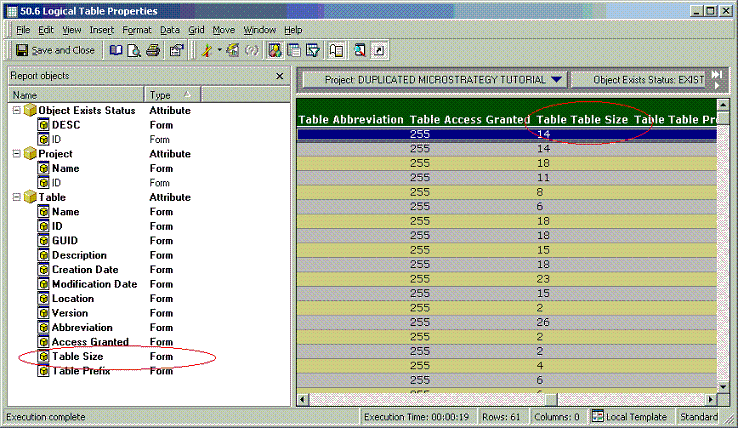
Strategy Enterprise Manager project 9.4.x - 10.x has a report named '50.6 Logical Table Properties' available in the following location: Enterprise Manager (Direct)/Enterprise Manager/Public Objects/Reports/Project Analysis/Object Properties Analysis. This report gives detailed information about logical tables, including logical table sizes. The logical table size is given by the attribute form 'Table Size' of the 'Table' attribute in the report, as shown below:
 

ka04W000000OgDlQAK_0EM440000002Bfm.gif


Comment

0 comments

Details

Knowledge Article

Published:

June 21, 2017

Last Updated:

June 21, 2017