EducationSoftwareStrategy.com
StrategyCommunity

Knowledge Base

Product

Community

Knowledge Base

TopicsBrowse ArticlesDeveloper Zone

Product

Download SoftwareProduct DocumentationSecurity Hub

Education

Tutorial VideosSolution GalleryEducation courses

Community

GuidelinesGrandmastersEvents
x_social-icon_white.svglinkedin_social-icon_white.svg
Strategy logoCommunity

© Strategy Inc. All Rights Reserved.

LegalTerms of UsePrivacy Policy
  1. Home
  2. Topics

KB12821: After opening a report exported to Microsoft Excel, the first row is hidden and when expanded, contains code in MicroStrategy Web 9.4.x-10.x


Community Admin

• Strategy


When exporting a report to an Excel file with formatting in MicroStrategy Web, sometimes the first line will be hidden. If this line is expanded, it contains code.

SYMPTOM:
When exporting a report to an Excel file with formatting in Strategy Web, sometimes the first line will be hidden. If this line is expanded, it contains code.
 
STEPS TO REPRODUCE:
To reproduce the issue in the Strategy Tutorial project, follow the steps below:
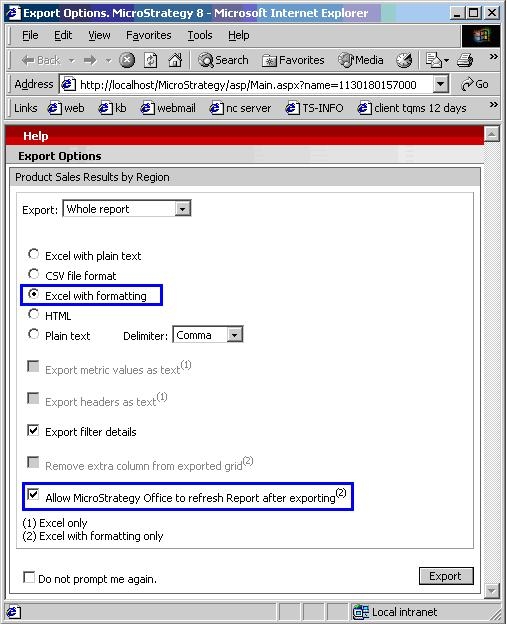
  • Export a report such as Product Sales Results by Region to Excel with formatting, and check the box for 'Allow Strategy Office to refresh Report after exporting,' as shown below:
ka04W000000OgZ8QAK_0EM4400000028xn.jpeg
  • When prompted, choose to Open instead of saving.
  • Notice how the first row is hidden, as shown below:
ka04W000000OgZ8QAK_0EM4400000028xl.jpeg
  • Expand the first row. Notice the code displayed within the first cell, as shown below:
ka04W000000OgZ8QAK_0EM4400000028xg.jpeg

CAUSE:
This hidden code is what Strategy Office uses to refresh the report, as it is being opened in a browser window instead of an Excel spreadsheet.
 
ACTION:
Unchecking the 'Allow Strategy Office to refresh Report after exporting' checkbox before exporting will resolve the issue, as shown below:
 

ka04W000000OgZ8QAK_0EM4400000028xk.jpeg

 
WORKAROUND:
If the Strategy Office refresh option is required, consider saving the Excel file before opening. This will resolve the issue as well, as shown below:
 

ka04W000000OgZ8QAK_0EM4400000028xm.jpeg


Comment

0 comments

Details

Knowledge Article

Published:

June 14, 2017

Last Updated:

June 14, 2017