EducationSoftwareStrategy.com
StrategyCommunity

Knowledge Base

Product

Community

Knowledge Base

TopicsBrowse ArticlesDeveloper Zone

Product

Download SoftwareProduct DocumentationSecurity Hub

Education

Tutorial VideosSolution GalleryEducation courses

Community

GuidelinesGrandmastersEvents
x_social-icon_white.svglinkedin_social-icon_white.svg
Strategy logoCommunity

© Strategy Inc. All Rights Reserved.

LegalTerms of UsePrivacy Policy
  1. Home
  2. Topics

KB12863: The HTML does not render correctly when adding HTML tags to the project description in MicroStrategy Web 9.x


Community Admin

• Strategy


This article explains how to use the option 'Project description in the projects page' to ensure that HTML tags used in the project description are rendered correctly.

SYMPTOM:

After adding HTML tags to the project description in Strategy Desktop 9.x, when the projects page displays in Strategy Web 9.x, the HTML output is not rendered, as shown in the following image:

 

ka04W000000OgbGQAS_0EM4400000028xp.jpeg


CAUSE:

This issue occurs due to changes made in the design of Strategy Web 9.x to enhance security.
 

ACTION:

In Strategy Web 9.x, it is possible to allow the HTML in the project description to be rendered properly by performing the following steps:
 

  • Access the Strategy Web Administrator page.
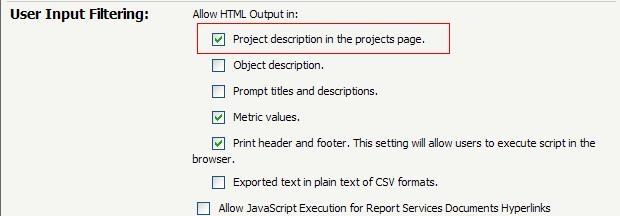
  • Navigate to the Security Section and select the option under the 'User Input Filtering' to enable 'Project description in the projects page', as shown below:
ka04W000000OgbGQAS_0EM4400000028xr.jpeg
  • Save the changes and return to the projects page in Strategy Web 9.x where the HTML output will be properly rendered, as shown below:
ka04W000000OgbGQAS_0EM4400000028xb.jpeg

Comment

0 comments

Details

Knowledge Article

Published:

June 13, 2017

Last Updated:

June 13, 2017