SYMPTOM:
After upgrading or re-installing Strategy products on a machine, users may find that two new project sources appear inside Strategy Developer or any other project source list, as shown below. These two project sources are named:

CAUSE:
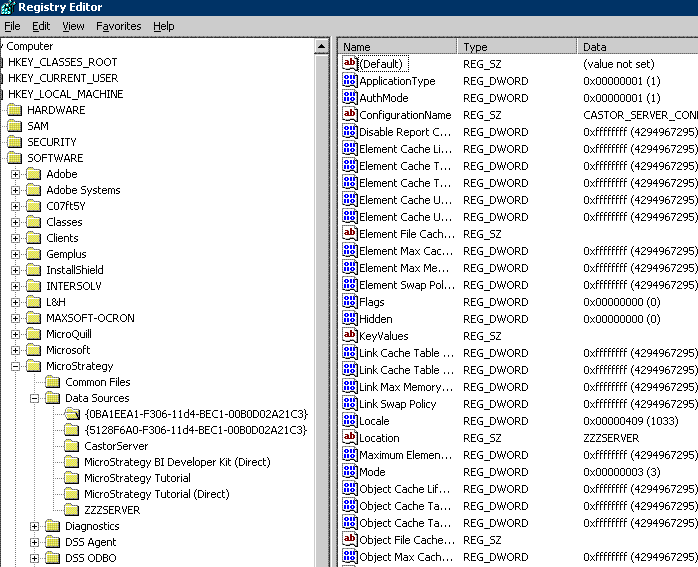
The project source {0BA1EEA1-F306-11d4-BEC1-00B0D02A21C3} is a hidden project source used by Project Builder.
The project source "CastorServer" is an internal data source that contains the information needed by the Intelligence Server to connect to the metadata after a restart. These project sources are not intended to be used by any other product or to be manually modified.
These project sources exist in the machine registry for Strategy by default whenever the appropriate products are installed. However, normally these project sources are hidden and users are unable to see these. In the case of a re-install or upgrade however - especially where a different set of products are installed compared to the original machine configuration, these project sources may be visible to users in the list of available project sources.
ACTION:
Users should not delete these project sources unless they are sure these will not be used (for example the Intelligence Server and Project Builder products are not installed). Deletion of the project sources may cause the Project Builder and Strategy Developer or the Intelligence Server to function abnormally.
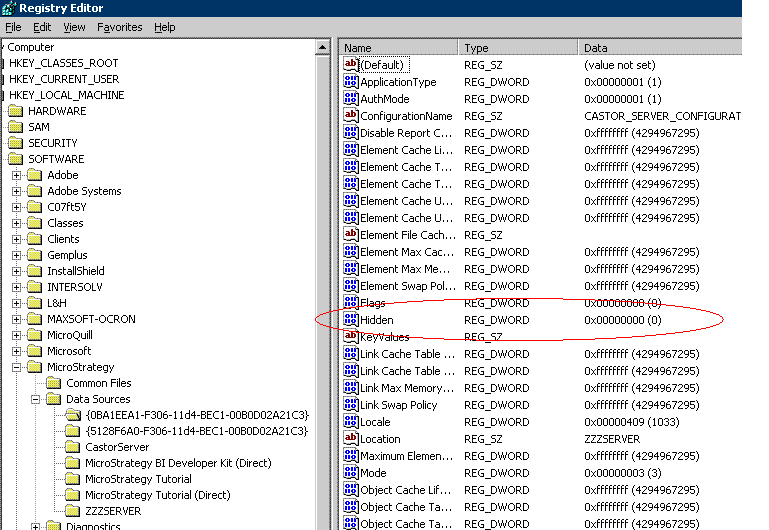
Users can hide the two project sources so that they are not viewable by following the steps below:



WARNING:
Modifying registry values incorrectly may cause serious, system-wide problems that may require the re-installation of Microsoft Windows NT. Any edit of the registry is done at the user's own risk. Since these are user-initiated changes, they are not covered by any Strategy warranty. If using Microsoft Windows NT, the user should backup the registry and/or update an Emergency Repair Disk (ERD) prior to alterations.
