EducationSoftwareStrategy.com
StrategyCommunity

Knowledge Base

Product

Community

Knowledge Base

TopicsBrowse ArticlesDeveloper Zone

Product

Download SoftwareProduct DocumentationSecurity Hub

Education

Tutorial VideosSolution GalleryEducation courses

Community

GuidelinesGrandmastersEvents
x_social-icon_white.svglinkedin_social-icon_white.svg
Strategy logoCommunity

© Strategy Inc. All Rights Reserved.

LegalTerms of UsePrivacy Policy
  1. Home
  2. Topics

KB12944: After enabling the Java Web API logs in MicroStrategy Web, there is Always a Stack Trace Exception Being Recorded in the Logs


Community Admin

• Strategy


After enabling the Java Web API logs in MicroStrategy Web, there is Always a Stack Trace Exception Being Recorded in the Logs

SYMPTOM:
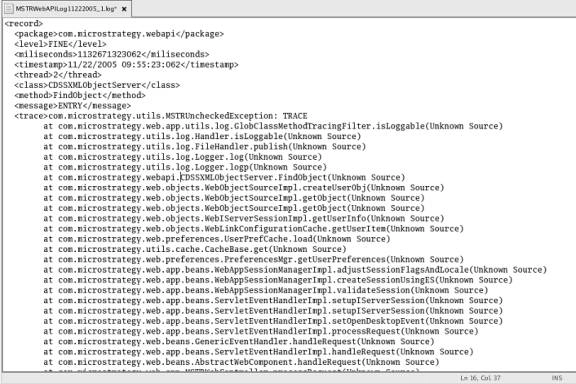
After enabling the Web API stack trace, exceptions similar to the one shown below are recorded consistently in the logs:
ka04W000000Og37QAC_0EM4400000028wz.jpeg

CAUSE:
The Web API filter stack trace is deliberate and is working as designed.
ACTION:
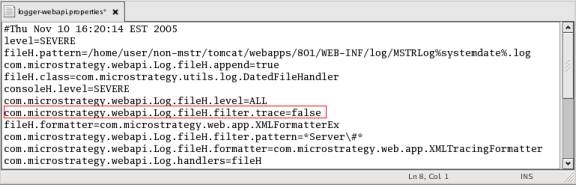
To turn off the Web API filter stack trace, set the filter.trace value to false in the Logger Web API Properties, as shown in the following image:
ka04W000000Og37QAC_0EM4400000028wu.jpeg

Comment

0 comments

Details

Knowledge Article

Published:

June 29, 2017

Last Updated:

June 29, 2017