EducationSoftwareStrategy.com
StrategyCommunity

Knowledge Base

Product

Community

Knowledge Base

TopicsBrowse ArticlesDeveloper Zone

Product

Download SoftwareProduct DocumentationSecurity Hub

Education

Tutorial VideosSolution GalleryEducation courses

Community

GuidelinesGrandmastersEvents
x_social-icon_white.svglinkedin_social-icon_white.svg
Strategy logoCommunity

© Strategy Inc. All Rights Reserved.

LegalTerms of UsePrivacy Policy
  1. Home
  2. Topics

KB13016: Users cannot import as many attribute elements into a filter from a file as exported in MicroStrategy Developer 9.4.1, 10.x., and 2019


Stefan Zepeda

Salesforce Solutions Architect • Strategy


After exporting a file to a text file and then importing attribute elements from the text file into a filter, the file becomes truncated in MicroStrategy Developer 9.4.1, 10.x., and 2019

SYMPTOM:
After exporting a file to a text file and then importing attribute elements from the text file into a filter, the file becomes truncated in Strategy Developer 9.4.1, 10.x., and 2019.
 
STEPS TO REPRODUCE:
Follow the steps below to reproduce this issue using the Strategy Tutorial project:
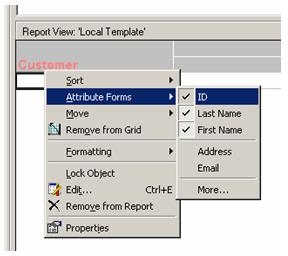
  • Create a report with the attribute Customer in the template. Make sure to show the ID form in the available attribute forms selection, as shown below:
ka02R000000g2nOQAQ_0EM440000002Fc1.jpeg
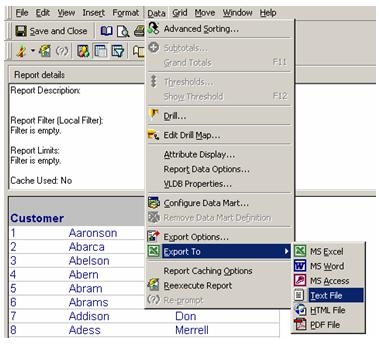
  • Execute this report and export it to a text file, as shown below. Notice that this export executes successfully.
ka02R000000g2nOQAQ_0EM440000002Fby.jpeg
  • In the same report, add a filter qualification on Customer, qualify on ID, and select the qualification to be In list.
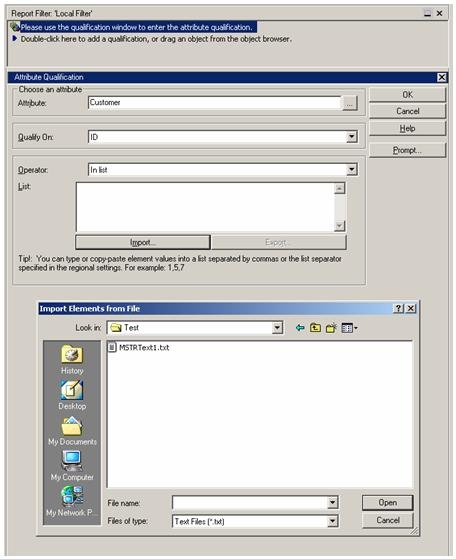
  • Push the import button and select the file created from the export, as shown below:
ka02R000000g2nOQAQ_0EM440000002Fbz.jpeg
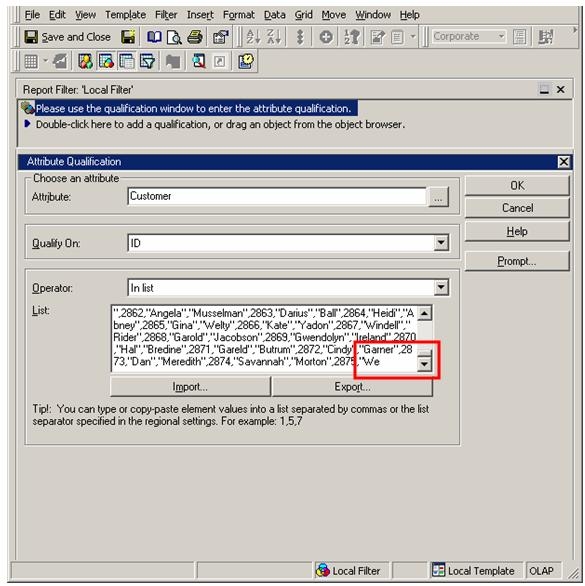
  • When importing this file, notice that the values have been truncated, as shown below:
ka02R000000g2nOQAQ_0EM440000002Fc0.jpeg

CAUSE:
There is a limit in this List box that is 65,535 characters long. This is functioning as designed.
 
WORKAROUND:
Filter by the attribute form values that hold the least amount of character space. Numbered ID forms are ideal to maximize the list of values held in this box.


Comment

0 comments

Details

Knowledge Article

Published:

May 31, 2017

Last Updated:

September 17, 2019