EducationSoftwareStrategy.com
StrategyCommunity

Knowledge Base

Product

Community

Knowledge Base

TopicsBrowse ArticlesDeveloper Zone

Product

Download SoftwareProduct DocumentationSecurity Hub

Education

Tutorial VideosSolution GalleryEducation courses

Community

GuidelinesGrandmastersEvents
x_social-icon_white.svglinkedin_social-icon_white.svg
Strategy logoCommunity

© Strategy Inc. All Rights Reserved.

LegalTerms of UsePrivacy Policy
  1. Home
  2. Topics

KB13048: How to remove report name links from HTML documents in MicroStrategy Web


Community Admin

• Strategy


When creating an HTML document, if a report is added to the document, a link with the report name will be added to the document as well. This link allows a user to execute the report in MicroStrategy Web, as shown below:

When creating an HTML document, if a report is added to the document, a link with the report name will be added to the document as well. This link allows a user to execute the report in Strategy Web 10.x, as shown below:
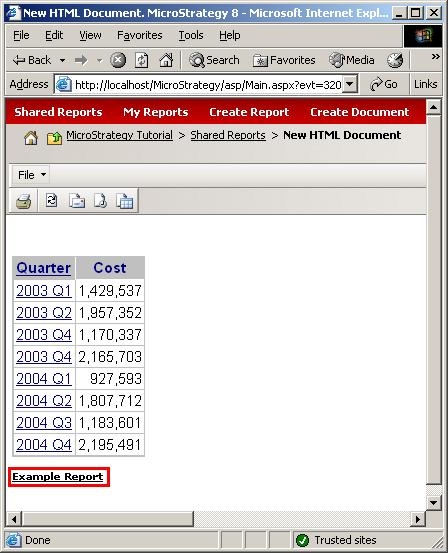
ka04W000000OfcIQAS_0EM4400000028wU.jpeg

 
To remove this link and only display the report grid, follow the steps below:
 

  • Navigate to C:\Program Files\MicroStrategy\Desktop\XSLs.
  • Make a copy of the Default.xsl file, as modifications will be made to it.
  • Open the Default.xsl file and search for 'report link', which should bring up the following section of code:
    <A><xsl:attribute name=`HREF`>RebuildReport.asp?ReportID=<xsl:value-of select=`$sReportID` />&MsgID=<xsl:value-of select=`/mi/im/@mid` />&view=Grid&redirect=False&Duplicate=True</xsl:attribute
    ><FONT FACE=`Verdana,Arial,MS Sans Serif` SIZE=`1` COLOR=`#000000`
    ><B><xsl:value-of select=`/mi/rit/rd/mi/in/oi/@n` /></B
    ></FONT
    ></A>
    <P />
  • Comment out or delete this section of code.
  • Restart Strategy Intelligence Server 8.x for the changes to the Default.xsl file to take effect.
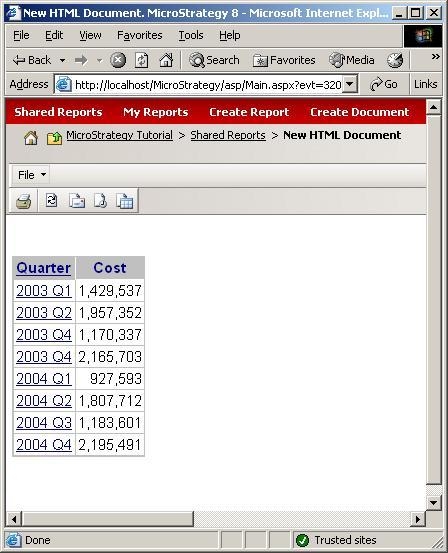
  • Execute the HTML document. The report names should no longer appear, as shown below:
ka04W000000OfcIQAS_0EM4400000028wV.jpeg

Customization Warning:
This customization is provided as a convenience to Strategy users and is only directly applicable to the version stated. While this code may apply to other releases directly, Strategy Technical Support makes no guarantees that the code provided will apply to any future or previous builds. In the event of a code change in future builds, Strategy Technical Support makes no guarantee that an updated version of this particular customization will be provided. If further assistance is needed, contact the Strategy Consulting team.
 
13048


Comment

0 comments

Details

Knowledge Article

Published:

June 15, 2017

Last Updated:

May 29, 2018