SYMPTOM:
The following error occurs when accessing either the Web Administrator page or the login screen in Strategy Web 9.x and above:
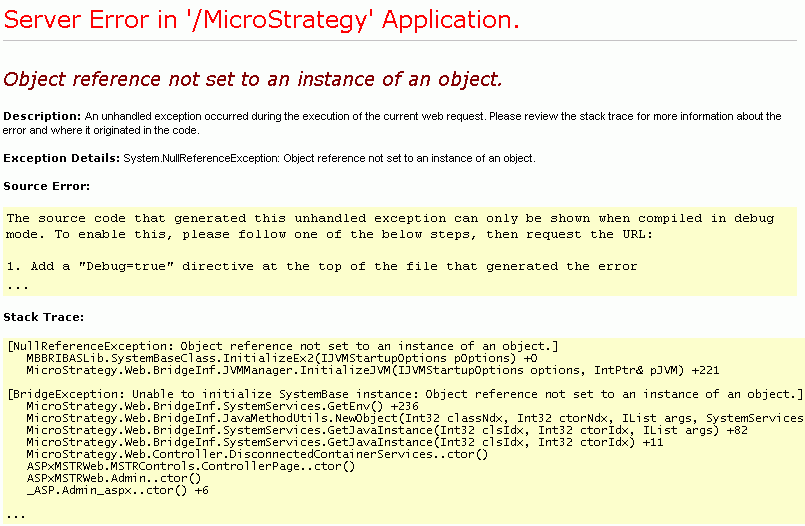
Server Error in '/ Strategy' Application.
Object reference not set to an instance of an object.
Description: An unhandled exception occurred during the execution of the current web request. Please review the stack trace for more information about the error and where it originated in the code.
Exception Details: System.NullReferenceException: Object reference not set to an instance of an object.
Stack Trace:
MBBRIBASLib.SystemBaseClass.InitializeEx2(IJVMStartupOptions pOptions) +0
Strategy.Web.BridgeInf.JVMManager.InitializeJVM(IJVMStartupOptions options, IntPtr& pJVM) +221
The error 'Page Cannot Be Displayed' may appear when Strategy Web is running on Windows 2003 SP1
The JVMMessages.log, located under the C:\Program Files\Common Files\MicroStrategy\Log folder, will also report the error: 'Could not reserve enough space for object heap':
2006-12-11 12:03:35.987-08:00 Error occurred during initialization of VM
2006-12-11 12:03:35.987-08:00 Could not reserve enough space for object heap
CAUSE:
Having several processors on the Strategy Web 9.x and above machine could impact the JVM initialization. The amount of memory available to JVM heap size is dependent on the number of processors. The higher the number of processors, the bigger the .NET heap size becomes independently of Strategy. Therefore there is much less memory available for JVM heap size (configurable through Strategy).
Basically, it seems that JVM is trying to reserve large blocks of memory when it is initialized, even though it may not need it all. It is in a way a preventive measure on the JVM part. This amount is dependent on the HeapMaxSize registry setting in HKEY_LOCAL_MACHINE\SOFTWARE\MicroStrategy\JNI Bridge\Configuration\JVM Options.
ACTION:
Decrease the value of the HeapMaxSize setting in the registry and restart Internet Information Services (IIS) where Strategy Web 9.x and above is installed.
If this action resolves the issue, the administrator must enable 4GT switch in order to increase the amount of memory available to the JVM heap.
The following Strategy Knowledge Base documents discuss the JVM heap size in more depth and how to enable 4GT switch:
KB5600-75x-1376 - 'Error occurred during initialization of VM' error message is logged to the debug monitor and Strategy Web 8.x fails to start.
KB5800-75x-0605 - What is the recommended usage of the 4GT switch across the Strategy 8.x platform?
Registry Modification:
WARNING:
Modifying registry values incorrectly may cause serious, system-wide problems that may require the re-installation of Microsoft Windows NT. Any edit of the registry is done at the user's own risk. Since these are user-initiated changes, they are not covered by any Strategy warranty. If using Microsoft Windows NT, the user should backup the registry and/or update an Emergency Repair Disk (ERD) prior to alterations.
Third Party Software Installation:
WARNING:
The third-party product(s) discussed in this technical note is manufactured by vendors independent of Strategy. Strategy makes no warranty, express, implied or otherwise, regarding this product, including its performance or reliability.
13069
