SYMPTOM:
When executing reports in Strategy Developer against a SQL Server 2000 warehouse, users may encounter the following error:
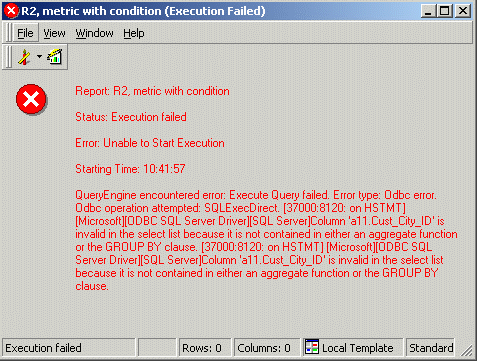
QueryEngine encountered error: Execute Query failed. Error type: Odbc error. Odbc operation attempted: SQLExecDirect. Column 'a11.Cust_City_ID' is invalid in the select list because it is not contained in either an aggregate function or the GROUP BY clause.
The error occurs in reports that have certain logical views in the SQL along with metric qualifications in the report filter.
CAUSE:
This issue is a result of a limitation in the SQL Server parser. SQL Server is unable to process queries that have the following four characteristics:
Removing any one of these characteristics causes the query to execute successfully in SQL Server, although its results might be different.
The issue will generally be specific to metric qualification SQL passes in Strategy. The Strategy SQL Engine treats metric qualifications as 'Set qualifications,' in which the procedure is to generate a set of attribute element IDs for which the condition is true, and then intersect (inner join) that set with later result sets that depend on the condition. The final result is thus restricted to rows that meet the qualification.
In producing a set of attribute IDs, there is no need to calculate a metric in the SELECT clause, so the engine omits the metric for efficiency. Conditions based on aggregating metrics must appear in the HAVING clause. Thus, by definition, metric qualification passes have two of the necessary conditions for this error to occur.
The following is an example of a metric qualification SQL pass that will trigger this error. The logical view with the outer join ('right join') is highlighted in red, and the non-aggregating expression appears in blue:
select a11.Call_Ctr_ID Call_Ctr_ID,
case when a11.Cust_City_ID = 1 then 100 else a11.Cust_City_ID end CustCol_4
into #ZZTSZ008MSKMQ000
from (select case when lv1.call_ctr_id = 1 then 100 else lv1.call_ctr_id end call_ctr_id,
lv1.center_name, lv1.region_id, lv2.region_name, lv3.cust_city_id,
lv3.tot_dollar_sales, lv3.tot_unit_sales,
lv3.tot_cost
from lu_call_ctr lv1 right join lu_region lv2
on (lv1.region_id = lv2.region_id)
join city_ctr_sls lv3
on (lv1.call_ctr_id = lv3.call_ctr_id)) a11
group by a11.Call_Ctr_ID,
case when a11.Cust_City_ID = 1 then 100 else a11.Cust_City_ID end
having sum(a11.Tot_Dollar_Sales) > 1500.0
ACTION:
To resolve the problem, recast the metric qualification as a report-as-filter using the following steps:
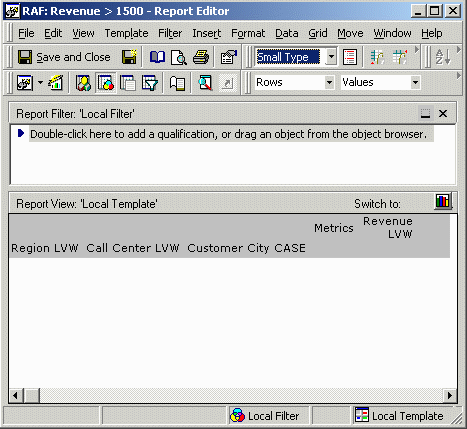
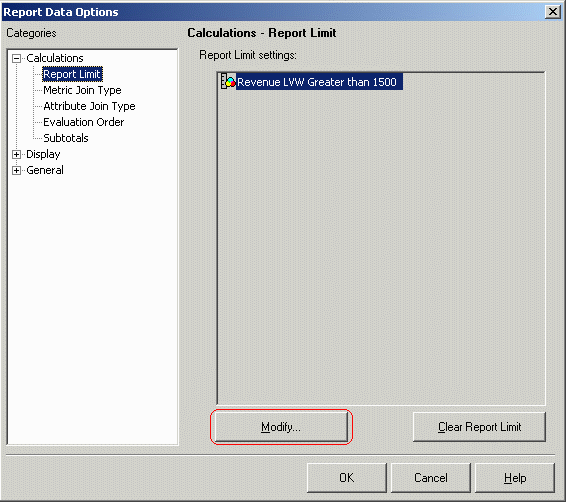
NOTE: When using a report-as-filter, it is necessary to define the output level explicitly in terms of the template attributes. Metric qualifications may have dynamic output levels like 'Report level' and 'Default metric level.' These cannot be used with report-as-filter. Normally this will not be a problem, but issues may arise for Web Professional users who have the ability to add or remove template units. If the intended output level of the filter is 'Report level' and the user changes the report level by adding or removing attributes, a standard metric qualification's output level would update to reflect the change, while a report-as-filter's output level would not. This may have an impact on the report results.
SQL for the new report is produced as follows. Note that the first pass, which renders the report-as-filter, now has an aggregate function (sum) in the select clause and will execute correctly against SQL Server:
select a11.Region_ID Region_ID,
a11.Call_Ctr_ID Call_Ctr_ID,
case when a11.Cust_City_ID = 1 then 100 else a11.Cust_City_ID end CustCol_4,
sum(a11.Tot_Dollar_Sales) WJXBFS1
into #ZZTSZ008NZ9MQ000
from (select case when lv1.call_ctr_id = 1 then 100 else lv1.call_ctr_id end call_ctr_id,
lv1.center_name, lv1.region_id, lv2.region_name, lv3.cust_city_id,
lv3.tot_dollar_sales, lv3.tot_unit_sales,
lv3.tot_cost
from lu_call_ctr lv1 right join lu_region lv2
on (lv1.region_id = lv2.region_id)
join city_ctr_sls lv3
on (lv1.call_ctr_id = lv3.call_ctr_id)) a11
group by a11.Region_ID,
a11.Call_Ctr_ID,
case when a11.Cust_City_ID = 1 then 100 else a11.Cust_City_ID end
having sum(a11.Tot_Dollar_Sales) > 1500.0
select a11.Region_ID Region_ID,
max(a14.REGION_NAME) REGION_NAME,
a11.Call_Ctr_ID Call_Ctr_ID,
max(a11.Center_Name) Center_Name,
case when a11.Cust_City_ID = 1 then 100 else a11.Cust_City_ID end CustCol_4,
max(a13.CUST_CITY_NAME) CUST_CITY_NAME,
sum((a11.Tot_Dollar_Sales - a11.Tot_Cost)) WJXBFS1
from (select case when lv1.call_ctr_id = 1 then 100 else lv1.call_ctr_id end call_ctr_id,
lv1.center_name, lv1.region_id, lv2.region_name, lv3.cust_city_id,
lv3.tot_dollar_sales, lv3.tot_unit_sales,
lv3.tot_cost
from lu_call_ctr lv1 right join lu_region lv2
on (lv1.region_id = lv2.region_id)
join city_ctr_sls lv3
on (lv1.call_ctr_id = lv3.call_ctr_id)) a11
join #ZZTSZ008NZ9MQ000 pa12
on (a11.Call_Ctr_ID = pa12.Call_Ctr_ID and
case when a11.Cust_City_ID = 1 then 100 else a11.Cust_City_ID end = pa12.CustCol_4)
join LU_CUST_CITY a13
on (case when a11.Cust_City_ID = 1 then 100 else a11.Cust_City_ID end = case when a13.CUST_CITY_ID = 1 then 100 else a13.CUST_CITY_ID end)
join LU_REGION a14
on (a11.Region_ID = a14.REGION_ID)
group by a11.Region_ID,
a11.Call_Ctr_ID,
case when a11.Cust_City_ID = 1 then 100 else a11.Cust_City_ID end
drop table #ZZTSZ008NZ9MQ000
